

On this page
To get started with n8n, pick one small repetitive task, map it out in plain English, then build and test it one node at a time inside a single workflow. To scale, you graduate from a pile of separate workflows to a master workflow that calls reusable sub-workflows, swap spreadsheets for a real database, and self-host once your volume justifies it. Everything else in this n8n automation guide is detail on top of those two moves.
Most tutorials show you what a finished automation looks like. This one shows you how to think about, build, and grow one, so your first workflow is not a fragile toy and your tenth is not an unmaintainable mess.
What n8n Is (And When to Choose It)
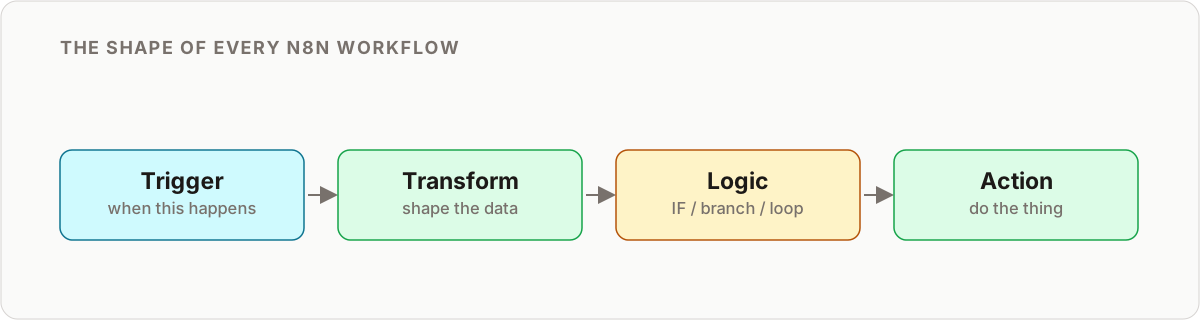
n8n is a workflow automation tool. You connect nodes on a visual canvas, each node either triggers the workflow or performs an action, and data flows from one node to the next. It sits in the same category as Zapier and Make, with two differences that matter: you can self-host it, and you can drop into code whenever the visual layer runs out of room.
That combination is why operators pick it. You get no-code speed for the boring 80 percent of a workflow and real logic for the 20 percent that would otherwise force you into a custom script.
n8n is the right choice when:
- You need custom logic the point-and-click tools cannot express, such as looping over records, branching on conditions, or transforming data with a few lines of JavaScript.
- You want to self-host for data privacy or cost control.
- You run high execution volume and per-task pricing would bankrupt the project.
- You are building AI-native workflows that call an LLM as a reasoning step.
It is the wrong choice when you only need to connect two apps once and never touch it again. For that, a simpler tool is faster to set up. If you are weighing options, our n8n vs Make comparison breaks down where each one wins, and when not to use n8n is an honest look at the cases where automation is the wrong answer entirely.
Part 1: Picking Your First Automation
The biggest mistake beginners make is trying to automate everything at once. The second biggest is picking a project so ambitious it never ships. The fix is to find one small, repetitive, high-impact task and start there.
Ask yourself and your team three questions:
- What do you do every day that feels like copy-and-paste work? For example, moving data from an email into a spreadsheet.
- Where do simple mistakes cause the biggest headaches? For example, typos in order entry, or a follow-up that never got sent.
- What process makes you say “I wish a robot could do this”? For example, generating a weekly report by hand.
A perfect first project saves someone roughly 30 minutes a day and is easy to explain in one sentence, such as “send a Slack message for every new sale.” Use this matrix to score candidates before you commit.
First-project selection matrix
| Factor | Good first project | Skip for now |
|---|---|---|
| Frequency | Runs daily or many times a day | Runs once a quarter |
| Complexity | 3 to 6 steps, one clear path | Many branches and exceptions |
| Data volume | Small, predictable | Huge or unpredictable spikes |
| Blast radius if it breaks | Low, someone notices quickly | High, silent failures are costly |
| Stakeholder | One owner who wants it | Committee that has not agreed |
Pick the task that lands in the left column across every row. You are optimizing for a fast, visible win that builds trust, not for the most impressive automation you can imagine.
Part 2: Building Your First Workflow the Right Way
Once you have your task, resist the urge to start dragging nodes. The order of operations below is what separates a workflow you can rely on from one you quietly stop trusting.
1. Map it out in plain English
Write the steps as a sentence before you touch the canvas: “When a new email arrives in the Invoices folder, get the PDF attachment, read the invoice number, and add a row to the Invoices sheet.” If you cannot write it, you cannot build it. This sentence also becomes your test plan.
2. Start with the trigger
Every n8n workflow begins with “when this happens.” That is your trigger node. The three you will use most:
- Schedule trigger runs on a clock, for example every morning at 8am.
- Webhook trigger runs when another system sends data to a URL. This is how you connect forms, apps, and other tools.
- App event triggers fire on events like a new email, a new row, or a new payment.
Get the trigger firing on its own before you build anything downstream.
3. Add nodes incrementally and test each one
Add one node, run the workflow, confirm that single step produces the data you expect, then add the next. This is the single most important habit in this n8n tutorial. Building the whole chain and running it once at the end turns a two-minute fix into an hour of guessing which of eight nodes is wrong.
n8n makes this easy: each node shows its input and output data, so you can inspect exactly what came in and what went out at every step. Two habits speed this up. First, pin the output of a slow or rate-limited trigger so you can iterate on downstream nodes without re-fetching every time. Second, when a node output looks wrong, read its input first, most “broken node” bugs are actually the previous node handing over the wrong shape of data.
4. Handle errors from day one
Ask what happens when the PDF is missing, the sheet is offline, or the API rate-limits you. A workflow that fails silently is worse than no workflow, because people stop doing the manual task while the automation quietly does nothing. Build in resilience from the start:
- Use the Continue On Fail setting on nodes where a single bad item should not stop the batch.
- Configure an error workflow that fires whenever any workflow fails and sends you a Slack or email alert.
- Add retry on fail for flaky external APIs so a momentary blip does not become an incident.
We go deep on this in our guide to reliable n8n automation for small businesses, because reliability, not cleverness, is what makes automation worth trusting.
Part 3: Core Concepts That Make You Dangerous
Four ideas unlock most of what n8n can do. Learn these and you stop copying tutorials and start building your own.
Data flow and items. n8n passes data between nodes as a list of items, each a JSON object. A node runs once per item by default, so if 20 rows come in, the next node runs 20 times. Understanding this is the difference between “why did it send 20 emails” and building a batch on purpose.
Expressions. Anywhere you can type a value, you can instead write an expression to pull data from earlier nodes, for example the sender of the triggering email or today’s date. Expressions are where a little JavaScript goes a long way, formatting a string, doing math, or reshaping data without a full Code node.
The Code node. When expressions are not enough, the Code node lets you write JavaScript (or Python) to transform items freely. Reach for it sparingly. If you can do it with a standard node, do, because standard nodes are easier for the next person to read.
Sub-workflows. The Execute Workflow node lets one workflow call another. This is how you avoid copy-pasting the same five nodes into ten workflows, and it is the foundation of scaling, which is next.
A quick way to internalize all four: think of items as the rows moving through your pipe, expressions as the small edits you make to each row in transit, the Code node as the workshop you send a row to when the standard tools cannot shape it, and sub-workflows as the machines you build once and reuse everywhere. Get comfortable inspecting item data at each step and the rest of n8n stops feeling like magic and starts feeling like plumbing you control.
Part 4: Scaling n8n Into a Real System
Your first workflow runs and you are saving time. Scaling n8n is about turning a collection of one-off automations into a system you can maintain as it grows.
- Build master workflows. Instead of dozens of separate workflows, create a main workflow that calls specialized sub-workflows with the Execute Workflow node. A “lead intake” master might call sub-workflows for enrichment, scoring, and routing. You fix a bug once, in one place, instead of hunting it across ten copies.
- Move to a real database. Google Sheets is a great place to start and a terrible place to scale. Once you pass a few thousand rows, need concurrent access, or want relational lookups, move to Postgres. It is faster, more robust, and will not corrupt data when two workflows write at once.
- Add a global error workflow. At scale you cannot babysit every run. One error workflow that catches failures across the whole instance and alerts you is non-negotiable.
- Self-host once volume justifies it. n8n Cloud is the right place to start. But as executions climb, self-hosting on a small VPS gives you unlimited runs, full data control, and predictable cost. See the self-host versus cloud trade-offs below.
- Version and stage changes. Use separate environments or export workflows to version control so you can test a change before it touches production.
Self-host vs n8n Cloud
| Factor | n8n Cloud | Self-hosted |
|---|---|---|
| Setup | Instant, no ops | You manage the server |
| Cost model | Subscription by volume | Fixed server cost |
| Execution limits | Plan-based | Effectively unlimited |
| Data control | On n8n’s infrastructure | Entirely yours |
| Maintenance | Handled for you | Updates and backups on you |
| Best for | Getting started, small teams | High volume, privacy, cost control |
The honest rule: start on Cloud, move to self-hosted when the maths or the privacy requirement flips. Do not self-host on day one just to save a few dollars, the time you spend on server maintenance is worth more than the subscription.
Part 5: AI-Native Automation
This is where a real competitive advantage gets built. Basic automation moves data between systems unchanged. AI-native automation adds a reasoning step so the workflow makes a judgment call.
- AI lead qualification. A lead arrives from your site. The workflow sends the company, title, and message to an LLM with a prompt: “Score this lead 1 to 10 for our business and explain why.” The score routes the lead to the right channel automatically.
- Automated content briefs. Feed a keyword to the workflow and have an LLM return a full brief, title options, headings, related questions, and angles, ready for a writer.
- Dynamic reporting. Instead of dumping numbers into Slack, pass the data to an LLM to write a plain-English summary of the week, so people actually read it.
The next step beyond a single AI call is an agent that can choose which tools to use. If that is where you are headed, start with building your first AI agent with n8n, then go deeper on patterns in our overview of n8n AI agents.
The Cost Model, Briefly
n8n’s pricing does not punish complexity the way per-task tools do. On n8n Cloud you pay a flat subscription tied to executions and active workflows, so a workflow with 15 steps costs the same to run as one with 3. Self-hosting turns cost into a predictable server bill plus whatever your AI and API usage adds. The practical takeaway: build workflows as detailed as they need to be without watching a per-step meter. If you are coming from a per-task tool, our Zapier to n8n migration guide covers how the savings actually play out.
Common Beginner Mistakes
- Building the whole workflow before testing. Test every node as you add it.
- No error handling. Silent failures erode trust faster than anything else.
- Automating a broken process. Automation makes a bad process fail faster. Fix the process first.
- Reaching for the Code node too early. Most of what beginners write in code has a standard node that does it more readably.
- Hardcoding credentials or values. Use n8n’s credential store and environment variables so nothing sensitive lives in the workflow.
- Spreadsheet as a database. Fine to start, a liability once multiple workflows depend on it.
- Trying to boil the ocean. One small win that ships beats a grand system that never does.
Your First 90 Days: A Roadmap
Days 1 to 15: One win. Pick a single task using the selection matrix. Build it incrementally, add error alerting, and let it run. Measure the time saved.
Days 16 to 45: A cluster. Automate three or four related tasks. Notice the steps you keep repeating and pull them into your first sub-workflow. Add a global error workflow.
Days 46 to 75: A system. Introduce a master workflow. Move shared data from spreadsheets to Postgres. Decide whether volume or privacy warrants self-hosting.
Days 76 to 90: Intelligence. Add one AI-native step, lead scoring, a content brief, or a summary, to a workflow that currently just moves data. This is where automation stops saving time and starts creating capability.
Key Takeaways
- Get started by picking one small task, mapping it in plain English, and building one tested node at a time.
- Add error handling on day one. Reliability is the whole point.
- Learn items, expressions, and sub-workflows early, they unlock everything else.
- Scale with master-and-sub-workflows, a real database, and self-hosting when volume justifies it.
- Use AI as a reasoning step to turn data-moving automations into decision-making ones.
You do not need to automate everything to see the value. You need one workflow that works, then a system that grows with you.
Ready to scale past your first workflow? Browse the n8n tutorials and n8n use cases for your next build.
Frequently asked questions
How do I use n8n for the first time?
Start with one task, not a system. Sign up for n8n Cloud or run it locally with Docker, add a trigger node (schedule, webhook, or an app event), then add one action node and test it before adding the next. Build incrementally and you will have a working automation within an hour.
How do I pick my first automation project?
Look for a small, repetitive task that feels like copy-and-paste work, causes frequent small mistakes, or makes you wish a robot could do it. A good first project saves someone about 30 minutes a day and is simple enough to explain in one sentence.
Is n8n good for beginners?
Yes. The visual editor lets you build without writing code, and you only reach for JavaScript expressions when you need to transform data. The learning curve is gentler than a raw API integration and more flexible than a locked-down no-code tool.
Should I use n8n Cloud or self-host?
Start on n8n Cloud so you can build without managing servers. Move to self-hosting once execution volume grows, you need unlimited runs, or data privacy matters. Self-hosting on a small VPS gives predictable monthly cost instead of per-execution pricing.
When should I move from Google Sheets to a real database in n8n?
Once a workflow's data outgrows a spreadsheet, more than a few thousand rows, multiple workflows reading and writing the same data, or you need relational lookups, move to Postgres. It handles concurrent access far better and will not silently corrupt rows.
How do I scale n8n past a handful of workflows?
Introduce a master workflow that calls specialized sub-workflows with the Execute Workflow node, centralize shared data in a database, add a global error workflow, and use environments or version control so changes are safe to ship.
What is the difference between automating a task and building an AI-native workflow?
Basic automation moves data between systems unchanged. AI-native automation adds a reasoning step, an LLM call that qualifies a lead, drafts a brief, or summarizes a report, so the workflow makes a judgment call instead of just relaying data.
How much does running n8n cost?
n8n Cloud is a flat monthly subscription tied to execution volume and active workflows. Self-hosting is the cost of a small server, often a low fixed monthly amount, plus any AI or API usage. Unlike per-task tools, cost does not spike with every step in a workflow.
Related reading
Keep learning
Step-by-step n8n tutorials, and free templates you can import and adapt.
Browse tutorials →Browse templates