

On this page
SEO agencies use n8n to automate the repetitive delivery layer of the business: scheduled client reports, daily rank tracking, technical-audit alerts, content-brief prep, backlink monitoring, and even the agency’s own lead generation. Anything that involves pulling data from an API on a schedule, transforming it, and pushing it somewhere useful is a candidate for automation. In practice that means the work that currently eats your team’s billable hours (copying Search Console numbers into a deck, re-running the same audit for every client, checking rankings by hand) can run on its own while your strategists do the work clients actually pay a premium for.
This is the complete playbook for n8n for SEO agencies: which tasks to automate, the concrete workflow patterns to build them, where automation pays off first, and the places you should deliberately keep a human in the loop. Every workflow below is described as real nodes and steps, not vague benefits.
Why n8n fits agency work specifically
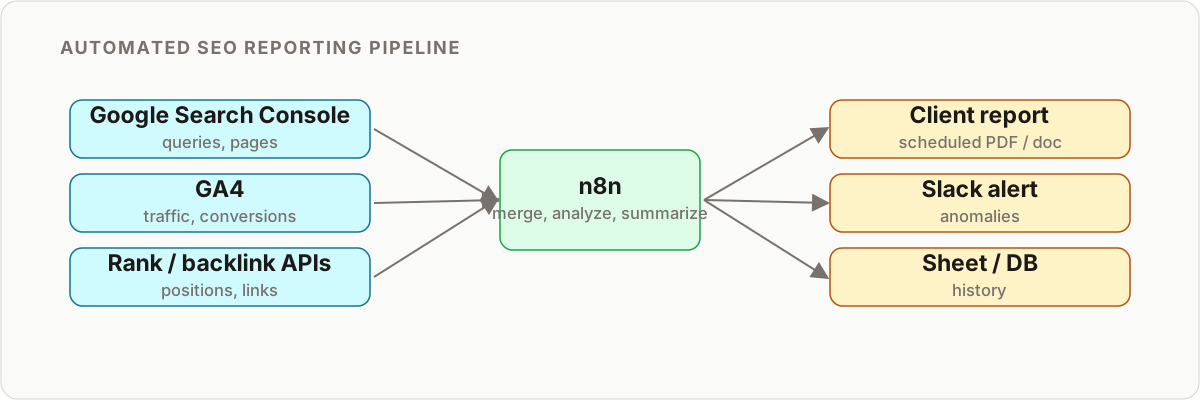
Agencies live and die on two numbers: how many clients each person can service, and how consistent the delivery is across all of them. n8n improves both because it removes the per-task cost penalty and standardizes output.
- No per-execution tax. Zapier and Make charge by task or operation, so your automation bill grows with every client you win. Self-hosted n8n runs on a server you already have, with no per-run fee, so the marginal cost of adding a client to a workflow is effectively zero. n8n Cloud exists if you would rather not host it yourself.
- Custom logic, not rigid connectors. SEO work rarely fits a pre-built template. n8n’s HTTP Request and Code nodes let you call any API and shape any data, which matters when you are stitching together GSC, GA4, a rank API, and a link tool in one flow.
- Data control. Self-hosting keeps client data on infrastructure you control, which is a real answer when a client asks where their analytics data lives.
- Templating for scale. One well-built workflow, parameterized per client, replaces a folder of near-identical duplicates. This is the core of white-labeling and it is where the leverage comes from.
For a deeper look at combining these automations with AI decision-making, see our guide on automating SEO and marketing with n8n AI agents.
What to automate vs. what to keep manual
Before building anything, draw the line. The goal is not to automate SEO. It is to automate the plumbing so humans can do the parts that require judgment.
| Task | Automate with n8n | Keep human |
|---|---|---|
| Client reporting | Data pull, joins, formatting, delivery | The strategic narrative and next-steps call |
| Rank tracking | Daily checks, logging, movement alerts | Deciding what to do about a drop |
| Technical audits | Crawling, checks, scoring, alerting | Diagnosing root cause and prioritizing fixes |
| Content briefs | SERP scraping, keyword clustering, brief scaffold | Editorial angle, expertise, final copy |
| Backlink monitoring | New/lost link detection, alerts | Outreach messaging and relationship building |
| Lead generation | Prospect enrichment, audit generation, routing | The sales conversation |
The pattern is consistent: automate the gathering and the delivery, keep the judgment and the voice. Anything that carries your reputation to a client should pass a human before it ships.
Workflow 1: Automated client SEO reporting
This is the single highest-ROI build for most agencies, because reporting is the most repeated task across the whole client book. Done manually it is hours of exporting, pasting, and reformatting every month. Automated, it builds itself and arrives on schedule.
Goal: A scheduled report that pulls Search Console and GA4 data, writes it to a shared source, and delivers a summarized update to the client.
The workflow pattern:
Schedule Triggerfires weekly or monthly.HTTP Request(or the Google API nodes) calls the Search Console API for clicks, impressions, average position, and top queries for the client’s property.- A second
HTTP Requestcalls the GA4 Data API for sessions, conversions, and channel breakdowns over the same window. Mergejoins the two datasets on date.Google Sheets(orBigQuery) writes the combined data to a source that Looker Studio reads for the visual dashboard.- An AI node (for example an OpenAI or Anthropic node) turns the numbers into a short plain-language commentary: what moved, by how much, and the likely reason.
SlackorSend Email(Gmail/SMTP) delivers the summary plus the dashboard link to the client channel.
The result is a branded, consistent report that you never assemble by hand again. The AI commentary step is optional but powerful: it converts raw metrics into the “so what” clients actually read. Keep the strategic recommendations human, though. Let the workflow summarize what happened, and let your strategist say what to do next.
To automate SEO reporting across your whole roster, drive the workflow from a client list (see the white-labeling section below) so one flow generates every client’s report in a single scheduled run.
Workflow 2: Daily rank tracking you own
Dedicated rank trackers are fine, but building your own means you own the historical data outright and pay no per-keyword subscription that scales with your keyword count.
Goal: A daily workflow that checks positions for each client’s target keywords and logs the trend.
The workflow pattern:
Schedule Triggerruns once daily.Google Sheetsreads the keyword list (keyword, client, target URL, location).HTTP Requestqueries a SERP API (a paid SERP data provider is more reliable and compliant than scraping Google directly).Codenode parses the response, finds the client’s domain, and records the position.Google Sheetsor a database appends the date, keyword, and rank.IFnode compares today’s position to yesterday’s; if a tracked keyword moves more than a set threshold, an alert fires toSlack.
The alerting is what makes this valuable. Nobody reads a rank sheet daily, but everyone reacts to a Slack ping that says a money keyword dropped five spots. For a full build of this specific pattern, see our n8n keyword tracker walkthrough and the broader n8n SEO automation workflows guide.
Workflow 3: Content brief pipelines
Content teams lose hours on the mechanical part of brief creation: pulling the top-ranking pages, extracting headings, listing entities to cover, and scaffolding the outline. n8n handles all of that so writers start from a populated brief instead of a blank page.
Goal: Turn a target keyword into a structured content brief automatically.
The workflow pattern:
WebhookorGoogle Sheetstrigger receives the target keyword.HTTP Requestcalls a SERP API for the top 10 ranking URLs.HTTP Requestfetches each URL;HTML Extractpulls titles, H2s, and H3s.Codenode aggregates the heading structure and word-count ranges across competitors.- An AI node clusters the recurring subtopics and drafts a suggested outline, target word count, and a list of questions to answer.
Google DocsorNotionnode creates a brief document pre-filled with all of it, assigned to the writer.
This keeps the human where they belong (the editorial angle, the expertise, the actual writing) while removing the tedious research scaffolding. The AI proposes structure; the writer owns the substance.
Workflow 4: Technical-audit automation
A manual technical audit is repeatable enough to template and valuable enough to run continuously rather than quarterly.
Goal: Crawl a site, check for common technical issues, score the results, and alert on regressions.
The workflow pattern:
Schedule Trigger(weekly) orWebhook(on demand).HTTP Requestcrawls key URLs or reads them from a sitemap.HTML Extractpulls title tags, meta descriptions, H1s, and canonical tags.- A loop of
HTTP Requestchecks status codes to find broken links and redirect chains. Codenode scores the page against a checklist (missing titles, duplicate metas, non-200 links, missing canonicals) and flags failures.IFnode compares against the last run; new issues trigger aSlackor email alert.- Optional
HTML/PDFstep produces a branded report for onboarding or client delivery.
Running this continuously turns technical SEO from a periodic project into a monitoring service. The workflow finds the issues; your specialist decides what they mean and how to prioritize the fixes.
Workflow 5: Backlink monitoring
Goal: Get alerted when a client (or a competitor) gains or loses notable backlinks.
The workflow pattern:
Schedule Triggerruns daily.HTTP Requestcalls your backlink tool’s API (Ahrefs, Semrush, or similar) for new and lost referring domains, orRSS Feed Readconsumes an export feed if you prefer.Filterkeeps only new, unique links above a domain-authority threshold.Codenode deduplicates against previously seen links stored in a Sheet or database.SlackorSend Emaildelivers the alert with the source and target URLs.
For clients this is a risk monitor (spot lost links fast). For competitor tracking it is outreach intelligence: when a competitor earns a link, you know exactly which publisher to pitch next.
Workflow 6: Programmatic and bulk SEO
When a client needs thousands of location, product, or category pages, n8n is a capable engine for the data-assembly side of programmatic SEO.
The pattern: read a dataset (spreadsheet, database, or API) with a Loop/Split In Batches node, merge each row into a page template, optionally enrich each record with an AI node for unique descriptions, and push the output to your CMS via its API or write structured files. n8n also handles bulk operations well: batch-updating meta descriptions across a large site, bulk-checking redirects after a migration, or generating and validating structured data at scale. Use Split In Batches rather than recursive loops to stay within API rate limits.
Workflow 7: Lead generation for the agency itself
The same skills that serve clients can fill your own pipeline. A public audit tool doubles as a lead magnet.
The workflow pattern:
Webhookreceives a URL from a “free SEO audit” form on your site.HTTP RequestandHTML Extractrun a lightweight version of the audit from Workflow 4.Codenode scores the site and identifies the top three fixable issues.HTML/PDFor email node delivers a branded mini-report to the prospect.HTTP Requestpushes the lead and their score into your CRM, tagged by audit result.Slacknotifies sales when a high-value prospect (low score, real business) comes in.
The prospect gets a genuine, useful audit. You get a qualified conversation and a warm reason to follow up. This is one of the cleanest examples of agency automation paying for itself.
The agency n8n stack: what you connect
None of these workflows exist in isolation. n8n is the hub; the value comes from what you wire into it. A typical agency stack looks like this:
- Data sources: Google Search Console API, GA4 Data API, a SERP data provider, and your backlink tool’s API (Ahrefs, Semrush, or similar).
- Storage: Google Sheets for quick builds, or a database (Postgres, BigQuery) and n8n data tables once volume grows. Store historical rank and audit data here so you own the trend line.
- Intelligence: an AI node (OpenAI or Anthropic) for report commentary, brief clustering, and content scaffolding. Keep prompts specific and always review the output.
- Delivery: Looker Studio for dashboards, Slack for internal alerts, and Gmail or SMTP for client emails.
- CMS and CRM: your CMS API for programmatic and bulk work, and your CRM for the lead-gen flow.
If your team already works in Claude Code or a similar AI dev environment, the n8n MCP and Claude Code guide shows how to build and manage these workflows with an AI assistant driving the n8n instance directly, which shortens the build time on every pattern above.
How to build your first workflow
Do not try to build the whole stack at once. Ship one workflow end to end, prove the value, then expand.
- Pick reporting. It is the fastest win and the clearest demonstration to a client or partner.
- Build it for one client first. Hard-code the domain and property while you get the data flowing, alerts firing, and formatting right.
- Externalize the variables. Once it works, move the client-specific values out of the workflow and into a list.
- Loop it over the list. Add
Split In Batchesand turn the single-client flow into a roster-wide one. - Layer the next workflow. With reporting off your plate, use the reclaimed hours to build rank tracking, then audits, then briefs.
This incremental path avoids the common trap of a half-built mega-workflow that never ships. Each stage delivers value on its own.
White-labeling: one template, every client
The leverage in seo automation n8n work comes from not rebuilding per client. The pattern:
- Build the workflow once with every client-specific value externalized: domain, keyword list, competitors, report recipients, branding, and report cadence.
- Store those values in a Google Sheet, a database table, or n8n data tables, one row per client.
- At the start of the workflow, read the client list and use
Split In Batchesto run the entire flow once per client. - Insert the right branding and recipients per iteration.
One reporting template then generates every client’s report in a single scheduled run. Add a client by adding a row, not by cloning a workflow. This is what makes n8n scale from a handful of accounts to a full book without adding delivery headcount.
Where NOT to automate
Automation has a failure mode: shipping robotic, low-quality work at scale and eroding the trust your agency runs on. Keep humans firmly in these loops:
- Strategy. A workflow can surface that traffic dropped. It cannot decide whether to double down on content, chase links, or fix technical debt. That is the judgment clients pay for.
- Outreach relationships. Automated, impersonal link-building pitches damage your reputation and rarely convert. Automate the research, personalize the message yourself.
- Final content QA. Never publish AI-generated content unread. Automate the brief and the draft scaffolding, not the final approval.
- Client-facing nuance. The report can build itself. The conversation about a bad month should not be a bot.
If you want a broader view of the marketing side of this, our guide to marketing workflow automation covers the campaigns and nurture flows that sit alongside these SEO builds.
Key takeaways
- n8n is the automation layer, not an SEO tool replacement. It orchestrates GSC, GA4, and the paid tools you already run, then delivers the output where clients and staff need it.
- Start with reporting. It is the most-repeated task in the agency and the easiest win to demonstrate.
- Automate collection and delivery, keep the judgment. The line between “automate” and “keep human” is the line between plumbing and strategy.
- Template for scale. Parameterizing one workflow across your whole client list is where the economics turn in your favor.
- Self-hosting removes the per-task tax that makes other platforms expensive as you grow.
Highest-ROI workflows to build first
In order, this is where a typical agency gets the fastest return:
- Automated client reporting (GSC + GA4 to Sheets/Looker + Slack/email summary).
- Rank tracking with movement alerts to Slack.
- Technical-audit monitoring with regression alerts.
- Content-brief pipeline to speed up the content team.
- Backlink and competitor monitoring.
- A public audit lead magnet for your own pipeline.
Build them in that order and each one frees the time you need to build the next.
To build it yourself, start with the n8n templates and the n8n use cases. If you would rather hire someone to build it, our guide on how to hire n8n experts covers what to look for.
Frequently asked questions
How do SEO agencies use n8n?
Agencies use n8n to automate the repeatable parts of delivery: scheduled client reports from Google Search Console and GA4, daily rank tracking, technical-audit alerts, content-brief assembly, backlink monitoring, and internal lead generation. n8n is the connective layer that moves data between SEO APIs, spreadsheets, databases, AI models, and client-facing channels like Slack and email without paying a per-task fee for every client you add.
What SEO tasks should you not automate?
Do not automate strategy, client communication that shapes the relationship, outreach personalization, or final quality control on published content. Automate data collection, monitoring, formatting, and alerting. The rule of thumb: automate the gathering and the plumbing, keep the judgment and the human voice.
Is n8n cheaper than Zapier or Make for an agency?
For agency-scale automation, usually yes. Zapier and Make price on tasks or operations, so cost climbs with every client and every workflow run. Self-hosted n8n runs on a server you already pay for, with no per-execution fee, which is why it scales cleanly across a large client book. n8n Cloud is also available if you would rather not manage hosting.
Can I automate SEO reporting with n8n?
Yes. A scheduled workflow can pull Google Search Console and GA4 metrics through their APIs, join the data, write it to Google Sheets or a Looker Studio data source, and send a summarized update to Slack or email. Add an AI node to turn the numbers into a plain-language commentary section, and you have a branded report that builds itself every week or month.
Do I need to code to build SEO workflows in n8n?
No for the basic versions. Core workflows use built-in nodes like Schedule Trigger, HTTP Request, Google Sheets, HTML Extract, Filter, and Merge. A small amount of JavaScript in a Code node improves parsing and scoring steps, but you can ship working automations before you write a single line of code.
How do agencies white-label n8n workflows for multiple clients?
Build one workflow template, then externalize every client-specific value: domain, keyword list, target competitors, report recipients, and branding. Store those in a Google Sheet, a database table, or n8n data tables, and loop the workflow over each client with a Split In Batches node. One template then serves your entire roster instead of a duplicated workflow per account.
What is the highest-ROI n8n workflow to build first?
Automated client reporting. It is the task that eats the most recurring hours across the whole agency, it is highly repetitive, and clients feel the value immediately. Once reporting runs itself, rank tracking and technical-audit alerting are the natural next builds.
Can n8n replace dedicated SEO tools like Ahrefs or Semrush?
No, and it is not meant to. n8n does not maintain a keyword database or a link index. What it does is orchestrate the tools you already pay for: it calls their APIs, combines their data with GSC and GA4, and delivers the output where your team and clients need it. Think of n8n as the automation layer on top of your SEO stack, not a replacement for it.
Related reading
Keep learning
Step-by-step n8n tutorials, and free templates you can import and adapt.
Browse tutorials →Browse templates