

On this page
n8n MCP is a Model Context Protocol server that connects Claude Code directly to your n8n instance, so you can describe a workflow in plain English and have Claude discover the right nodes, configure them, validate the result, and build it for you. Claude Code works with n8n by calling the MCP server’s tools: it searches n8n’s 1,000-plus nodes, reads their real property definitions, checks configurations against a validation engine, and can create or update workflows through your n8n API. You stay in control of the business logic and the decision to deploy.
What if you could stop wrestling with node configurations and connection errors and just say what you want? That is the shift n8n MCP unlocks, and this guide covers the whole picture: what MCP is and why it matters for n8n, the crucial difference between the n8n-MCP server and n8n’s own MCP nodes, setup that takes minutes, the real workflows you can ship, and how to do it all without wrecking production.
What Is MCP, and Why It Matters for n8n
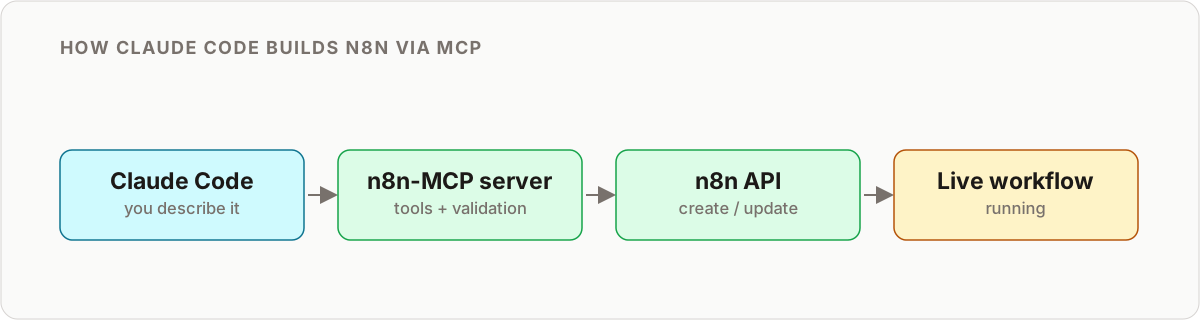
The Model Context Protocol is an open standard for connecting AI assistants to external tools and data. Think of it as a universal adapter: instead of every AI app inventing its own way to call every tool, MCP gives them one shared protocol. An MCP client (the AI side) talks to an MCP server (the tool side), and the server exposes a menu of tools the AI can call.
n8n matters here because n8n is where real work happens. It has connectors for over 1,000 services, a visual canvas, credential management, scheduling, and error handling already built. Wire an AI assistant to that through MCP and you get the best of both worlds: the reasoning and language ability of a model like Claude, plus a battle-tested execution engine that actually moves data between systems.
The magic of natural language automation. Instead of manually configuring Slack nodes, webhook triggers, and data transformations, you tell Claude: “When someone submits this form, validate the data, add it to our CRM, and send a notification to our #sales channel.” Claude builds the entire workflow for you.
This is not just convenience. It changes how you approach automation. You are no longer limited by how well you know a specific node’s configuration options. You focus on the outcome and the business logic while Claude handles the implementation detail. For a deeper primer on the standard itself and the wider ecosystem, see our overview of MCP servers and how they fit with n8n.
The Part Everyone Confuses: n8n-MCP Server vs n8n’s MCP Nodes
Here is the single most important thing to understand, because two very different capabilities share the same three letters. They point in opposite directions.
Direction one: AI builds n8n. The n8n-MCP server (the open-source project you run via npx or Docker) exposes n8n’s node knowledge and management API as MCP tools. Claude Code is the client. You use it to build, validate, and manage your workflows with natural language.
Direction two: n8n participates in MCP. n8n also ships its own MCP nodes inside the workflow editor. The MCP Server Trigger node turns one of your workflows into an MCP server that external AI clients can call as a tool. The MCP Client Tool node lets a workflow (usually an AI Agent) call other MCP servers as tools during execution.
Getting this distinction right saves hours of confusion. The table below lays it out.
| Aspect | n8n-MCP server | n8n MCP Server Trigger node | n8n MCP Client Tool node |
|---|---|---|---|
| What it is | Standalone server you run outside n8n | A trigger node inside a workflow | A tool node inside a workflow |
| Who is the client | Claude Code, Cursor, Windsurf | External AI apps calling your workflow | The AI Agent in your workflow |
| Direction | AI builds and manages n8n workflows | Your workflow becomes a tool for AI | Your workflow consumes external tools |
| Typical use | “Build me a workflow that…” | Expose a workflow as an AI-callable tool | Give an agent access to external MCP tools |
| You install | npx or Docker + client config | Nothing, it is built in | Nothing, it is built in |
Most people arriving here mean direction one: they want Claude Code to build workflows for them. That is the focus of this guide. If you are designing agentic workflows where n8n itself calls tools or gets called, our guide to connecting MCP servers to n8n goes deeper, and the guide to building AI agents in n8n covers the client node in context.
Why Natural Language Beats Manual Wiring
Traditional workflow building asks a lot of you. You have to know which nodes to use for each task, understand every configuration option, connect nodes and manage data flow by hand, debug connection and mapping errors, and write custom expressions for every transformation.
With n8n MCP you describe the outcome. Claude handles the technical implementation, validates the configuration against n8n’s schema, and can help optimize the workflow for reliability. The value is not that AI writes code you cannot. It is that the tedious lookup, wiring, and validation work collapses from an afternoon into a conversation, and the parts that need judgment stay with you.
Prerequisites
Before you start you will need:
- An n8n instance, self-hosted or cloud. Enable API access if you want full management rather than documentation lookups only.
- Claude Code or Claude Desktop with MCP support (any MCP-compatible client works).
- Node.js installed, to run the n8n-MCP server via npx.
- Basic familiarity with what n8n workflows, nodes, and credentials actually are, so you can review what Claude builds.
Step-by-Step Setup
For a fuller walkthrough, see how Claude Code builds n8n workflows end to end. The essentials are below.
Option 1: Quick start with npx (recommended)
The fastest way to get started is npx, which requires no installation:
npx n8n-mcpThis downloads and runs the latest version automatically. Next, configure Claude Desktop by editing its configuration file:
- macOS:
~/Library/Application Support/Claude/claude_desktop_config.json - Windows:
%APPDATA%\Claude\claude_desktop_config.json - Linux:
~/.config/Claude/claude_desktop_config.json
For documentation tools only (Claude can look up and validate nodes, but cannot touch your workflows):
{
  "mcpServers": {
    "n8n-mcp": {
      "command": "npx",
      "args": ["n8n-mcp"],
      "env": {
        "MCP_MODE": "stdio",
        "LOG_LEVEL": "error",
        "DISABLE_CONSOLE_OUTPUT": "true"
      }
    }
  }
}
For full n8n management (Claude can create and update workflows), include your API credentials:
{
  "mcpServers": {
    "n8n-mcp": {
      "command": "npx",
      "args": ["n8n-mcp"],
      "env": {
        "MCP_MODE": "stdio",
        "LOG_LEVEL": "error",
        "DISABLE_CONSOLE_OUTPUT": "true",
        "N8N_API_URL": "https://your-n8n-instance.com",
        "N8N_API_KEY": "your-api-key"
      }
    }
  }
}
Option 2: Docker deployment
For a more isolated setup, use the published Docker image:
docker pull ghcr.io/czlonkowski/n8n-mcp:latestConfigure Claude Desktop to run it:
{
  "mcpServers": {
    "n8n-mcp": {
      "command": "docker",
      "args": [
        "run", "-i", "--rm", "--init",
        "-e", "MCP_MODE=stdio",
        "-e", "LOG_LEVEL=error",
        "-e", "DISABLE_CONSOLE_OUTPUT=true",
        "-e", "N8N_API_URL=https://your-n8n-instance.com",
        "-e", "N8N_API_KEY=your-api-key",
        "ghcr.io/czlonkowski/n8n-mcp:latest"
      ]
    }
  }
}
Pro tip: local n8n setup. If you are running n8n locally via Docker, use
http://host.docker.internal:5678as yourN8N_API_URLand addWEBHOOK_SECURITY_MODE=moderateto allow local webhooks.
Documentation mode vs management mode
The presence of N8N_API_URL and N8N_API_KEY is what separates the two modes. Without them, the server is read-only knowledge: node search, property lookups, validation, and templates. With them, Claude can also create, update, and inspect workflows on your instance. Start in documentation mode while you learn, then add the API credentials once you trust the flow.
Testing the connection
Restart your MCP client and ask: “What n8n tools are available?” Claude should respond with a list of MCP tools, including node search, workflow validation, and template discovery. If it comes back empty, check the config file path and restart fully.
Building Your First Workflow with Natural Language
Let’s build something practical: a workflow that checks an RSS feed every hour and posts new articles to a Slack channel.
You: “Build me a workflow that checks an RSS feed every hour and posts new articles to our #content channel in Slack.”
Claude (with n8n MCP): “I’ll create an RSS monitoring workflow for you. Let me search for the appropriate nodes and build this step by step.” Behind the scenes, Claude searches for RSS and Slack nodes, validates configurations, and assembles the complete workflow.
What Claude actually does under the hood:
- Node discovery: searches n8n’s library for the RSS Feed Read and Slack nodes.
- Configuration: pulls detailed node properties and real-world examples so fields are set correctly.
- Validation: checks required fields and common errors before anything is built.
- Building: constructs the workflow with proper connections and error handling.
- Verification: validates the complete workflow structure before you deploy it.
The result is a complete workflow: a schedule trigger running every hour, an RSS Feed Read node configured with your feed URL, an IF node to check for new posts, a Slack node with a formatted message to the right channel, plus basic error handling. This same loop, described-then-built-then-validated, is exactly how teams end up shipping self-building n8n workflows with Claude Code.
Advanced Use Cases
Multi-step agentic workflows
n8n MCP shines with complex, multi-step automation. Consider this business process: “When a new customer signs up, research their company, generate a personalized welcome email using AI, add them to the appropriate email sequence based on their industry, and notify the sales team with context.”
Claude can build that entire flow: a webhook trigger for new signups, company data enrichment via an API, AI-powered email generation through an OpenAI or LangChain node, conditional branching by industry, CRM integration, a sales-team notification, and error handling at each step. You review the branches and the credentials, then deploy.
Template-based acceleration
The n8n-MCP server can surface community workflow templates. Ask “find me a template for social media automation and adapt it for our brand” and Claude will search the library, surface relevant workflows with author attribution, adapt the best match to your needs, then validate the modified workflow before you deploy it. Starting from a proven template is often faster and safer than building from a blank canvas.
Integration with n8n’s AI features
n8n MCP understands n8n’s own AI nodes (OpenAI, LangChain, and the AI Agent node) and can build sophisticated AI-powered workflows on top of them, from chatbots that escalate to a human to document-analysis pipelines that extract structured insights. You focus on the business logic instead of the node wiring. This is also where the two MCP directions meet: Claude Code builds the workflow, and inside that workflow an AI Agent can use n8n’s MCP Client node to call other tools at runtime.
Claude Code driving n8n as a project
Beyond one-off requests, teams keep their workflows as versioned artifacts and let Claude Code edit them like code: propose a change, validate it, review the diff, deploy. This “workflows as code” pattern is covered in depth in our guide to Claude Code self-building n8n workflows, and it is the most durable way to work because every change is reviewable.
Security and Human-in-the-Loop
AI that can create and modify live automation is powerful and needs guardrails. The rules below are not optional.
Production safety warning. Never edit production workflows directly with AI. Always make copies before AI modifications, test in a development environment first, export backups of important workflows, and validate changes manually before deploying.
A practical, safe setup:
- Use a dedicated instance for AI experimentation. Keep production separate from where Claude builds and iterates.
- Scope your API key. Give the key the minimum permissions it needs, and never expose a production instance directly.
- Keep a human on the deploy button. Claude proposes and validates. A person reviews and ships. That approval step is the whole point of human-in-the-loop.
- Audit AI-created workflows regularly. Review credentials used, external calls made, and data touched.
- Keep logging and monitoring on. You want a trail for anything an agent builds or runs.
Limitations and Gotchas
n8n MCP is not magic, and being honest about the edges keeps expectations sane.
What it still cannot do for you
- Complex custom JavaScript or Python logic often still needs a human to write and reason about.
- Sophisticated retry and error-recovery strategies still need deliberate human design.
- Resource-intensive workflows need manual performance tuning.
- Heavy or unusual data transformations sometimes still call for a custom node.
Where it can trip up
- AI can pick a plausible-but-wrong node when several look similar. Validation catches structural errors, not intent errors, so review the choices.
- Credentials still have to exist and be configured in n8n. The server references them; it does not create your Slack or Google auth for you.
- Version and node-availability differences between instances mean a workflow that validates against one instance may need tweaks on another.
Decision Guide: n8n-MCP Server vs n8n’s MCP Nodes
Which tool you reach for depends entirely on what you are trying to do.
| Your goal | Use this | Why |
|---|---|---|
| Get Claude Code to build a workflow for you | n8n-MCP server | It gives the AI client node knowledge and management access |
| Learn and validate nodes without touching workflows | n8n-MCP server (documentation mode) | Read-only, zero risk to production |
| Let an external AI app call your workflow as a tool | n8n MCP Server Trigger node | Turns your workflow into an MCP server |
| Give an AI Agent inside n8n access to external tools | n8n MCP Client Tool node | The agent consumes other MCP servers at runtime |
| Manage workflows as versioned code with reviewable diffs | n8n-MCP server (management mode) + Claude Code | Propose, validate, review, deploy loop |
The short version: if the sentence is “I want AI to build my automation,” you want the n8n-MCP server. If the sentence is “I want my automation to be part of an AI system,” you want n8n’s built-in MCP nodes.
n8n-MCP vs Direct API Calls
You could talk to n8n’s REST API directly instead of going through MCP. Here is the trade-off.
| Aspect | n8n-MCP | Direct API |
|---|---|---|
| Learning curve | Natural-language descriptions | Requires studying API docs |
| Error handling | Built-in validation and suggestions | Manual implementation |
| Speed | Faster for complex workflows | Faster for simple one-off calls |
| Flexibility | Bounded by n8n node capabilities | Full API access |
| Best for | Workflow automation, business processes | Custom integrations, scripted tasks |
Where This Is Heading
The direction of travel is clear: business logic matters more than technical implementation detail. As MCP adoption grows, expect more AI clients to speak it, more workflows to expose themselves as MCP tools, and more of the day-to-day building to become a review-and-approve activity rather than a wiring activity. n8n sitting in the middle, as both something AI can build and something AI can call, makes it one of the more strategically placed tools in this shift.
The winning skill is not “knows every node.” It is “can describe the outcome precisely and review the result critically.” That is a skill marketers and developers alike can build.
Key Takeaways
- n8n MCP connects Claude Code to n8n so you build, validate, and manage workflows in plain English while keeping the business logic and deploy decision yourself.
- Two directions, same acronym. The n8n-MCP server lets AI build n8n. n8n’s MCP Server Trigger and MCP Client nodes let n8n participate in AI systems. Do not confuse them.
- Setup is minutes. npx for a no-install start or Docker for isolation. Add
N8N_API_URLandN8N_API_KEYto move from documentation mode to full management. - Safety is non-negotiable. Dedicated instance, scoped key, test in dev, human on the deploy button, and audit what AI builds.
- Value scales with complexity. Simple workflows may be faster by hand; complex ones are dramatically faster described and validated through Claude Code.
Ready to Transform Your Automation?
n8n MCP represents where workflow automation is heading: describe the outcome, let the AI wire it, and keep a human in the loop for the parts that need judgment. It opens workflow creation to marketers and developers alike, and it makes complex automation that used to be out of reach genuinely approachable.
Start with simple workflows, experiment safely in a development instance, and grow into more complex automation as you learn what is possible. The combination of n8n’s execution engine and Claude’s reasoning is a powerful one.
If you would rather have someone who builds these for a living design and ship it for you, let’s talk.
Frequently asked questions
What is n8n MCP?
n8n MCP (also written n8n-MCP) is a Model Context Protocol server that gives Claude Code structured access to n8n's node library, documentation, and validation tools. It lets an AI assistant discover the right nodes, configure them correctly, validate the result, and optionally create or update workflows through your n8n API. It is the bridge that turns a plain-English request into a real, working workflow.
What is the difference between n8n-MCP and n8n's MCP nodes?
They point in opposite directions. The n8n-MCP server lets an AI client like Claude Code build and manage your n8n workflows. n8n's own MCP Server Trigger node turns one of your workflows into an MCP server that external AI clients can call, and the MCP Client node lets a workflow call other MCP servers as tools. One helps you build n8n with AI, the others let n8n participate in the wider MCP ecosystem.
Do I need to be technical to use n8n MCP?
Not really. If you can describe what you want in plain English, for example send me a Slack message when someone fills out this form, Claude Code can build it. Basic n8n familiarity helps you review the output and own the business logic, but n8n MCP handles most of the technical detail.
Is my data safe when using n8n MCP?
By default the n8n-MCP server only provides documentation and node information to Claude. It does not touch your actual workflows or data unless you specifically add API access, and even then it operates through your own n8n instance. Use a scoped API key, test in a development instance, and review before you deploy to production.
Can I use n8n MCP with other AI tools besides Claude?
Yes. n8n MCP works with any tool that supports the Model Context Protocol, including Claude Desktop, Cursor, Windsurf, and other MCP-compatible AI assistants, not just Claude Code.
What if n8n MCP generates a broken workflow?
The n8n-MCP server includes validation tools that check node configuration and workflow structure before deployment, which catches most issues. AI output can still be unpredictable, so always test in a development environment and review the workflow manually before it touches production.
How does this compare to writing workflows manually?
For a simple three-node workflow, building it by hand might genuinely be faster. For complex automation with multiple conditions, error handling, and data transformations, describing it in natural language and letting Claude Code wire it is significantly faster and less error-prone than clicking node by node.
Does n8n MCP work with n8n Cloud?
Yes, as long as API access is enabled on your instance. You need your n8n instance URL and an API key. Self-hosted instances work the same way, and are usually the better choice for AI experimentation because you control the environment.
Related reading
Still broken?
Send me your workflow JSON and the error you are hitting. I will tell you what is wrong, in writing, within 24 hours. Free, and there is no pitch attached.
Get a free diagnosis →