
On this page
n8n vs Windmill: which should you pick?
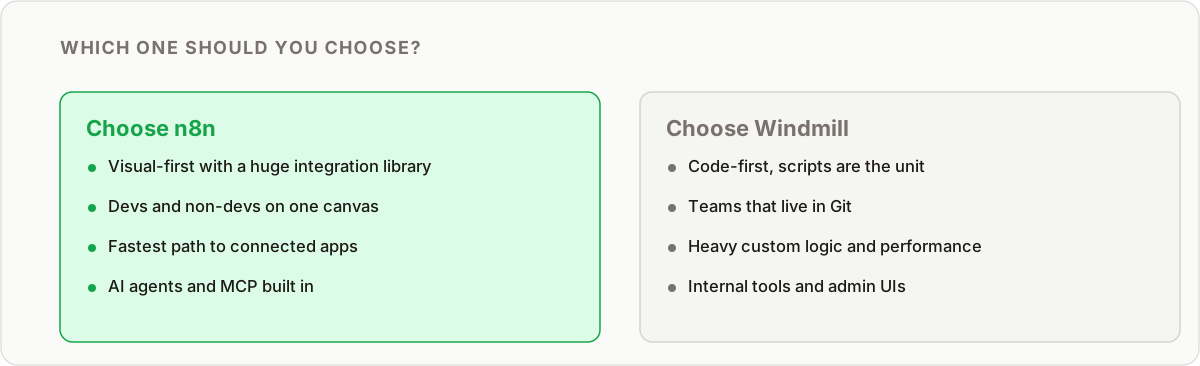
Short answer: choose n8n if you are wiring together lots of SaaS apps and want a visual canvas your whole team can read; choose Windmill if your automation is code-heavy, git is your source of truth, and everyone who touches it already lives in an IDE. Both are open source, both self-host, and both are genuinely good. The decision is not about which tool is “better” in the abstract. It is about your team and the kind of work you are automating.
I run n8n in production for client automations every week, so I have a clear bias toward the visual, connector-first model. But Windmill is a strong, honest tool, and this comparison stays fair. Below is the side-by-side, then the detail behind each row.
n8n vs Windmill at a glance
| Dimension | n8n | Windmill |
|---|---|---|
| Core model | Visual-first canvas, code inside nodes | Code-first scripts, auto-generated UI |
| Languages | JavaScript and Python inside Code nodes | Python, TypeScript, Go, Bash, SQL |
| Pre-built integrations | 400+ native nodes | Fewer native; community scripts or DIY |
| Self-hosting | Yes, open source, single container | Yes, open source, worker-based |
| Pricing model | Free self-hosted; paid cloud and enterprise tiers | Free self-hosted; paid cloud and enterprise tiers |
| Learning curve | Gentle, non-devs can contribute | Steeper, natural for developers |
| Version control | JSON export, git-trackable but noisy diffs | Scripts map cleanly onto standard git |
| Best for | SaaS glue, cross-team workflows, fast API work | Complex internal tools, code-heavy logic, script APIs |
Use the table for the quick call. Read on for the reasoning, because the row that matters most depends entirely on your situation.
The core philosophy: visual-first vs code-first
This is the single distinction that everything else flows from.
n8n is visual-first. The primary interface is a canvas where you connect pre-built nodes. Each node is a step: fetch data, transform it, branch on a condition, send it somewhere. When the built-in nodes cannot do what you need, you drop into a Code node and write JavaScript or Python inline. But the shape of the workflow stays visual. That makes it fast for API glue work and readable by people who do not write code.
Windmill is code-first. You write a script in Python, TypeScript, Go, or Bash, and Windmill wraps it: it auto-generates an input form (a UI), exposes the script as an API endpoint, and manages the execution environment. You compose scripts into flows when you need orchestration. The code is the source of truth, not a diagram.
Neither model is universally correct. If you think in code and resent clicking through a canvas, Windmill will feel liberating. If you want to see data flow at a glance and hand a workflow to a teammate in ops, n8n wins. This is the same tension I unpack in more depth in visual vs code workflow tools.
Integrations: ecosystem vs DIY
This is where the two tools diverge most in day-to-day use.
n8n’s strength is its library of 400+ pre-built nodes. Connecting to Slack, Google Sheets, Airtable, Stripe, HubSpot, or Notion is a matter of picking the node, authenticating once, and choosing an operation. The node handles OAuth token refresh, pagination through large result sets, and credential storage for you. That is a lot of tedious, error-prone plumbing you simply do not write.
Windmill leans on community scripts or your own integration code. There are shared scripts on its hub, and reusing one is quick. But for anything off the beaten path, you are writing the API client yourself: auth, retries, pagination, error handling. That is more flexible when you are hitting an obscure internal API that no connector exists for. It is significantly more work when all you want is to post a message to a Slack channel.
My take: for any project centred on connecting the modern SaaS ecosystem, n8n gets you there far faster. For a workflow that is mostly custom business logic against a couple of internal endpoints, Windmill’s overhead is smaller than it looks.
If most of your integrations are the usual suspects, the connector gap alone often decides it. That same connector depth is why n8n stacks up well against hosted tools too, which I cover in n8n vs Make and n8n vs Zapier.
The “visual spaghetti” problem: managing complexity
The most common fear developers raise about visual builders is that complex workflows become an unreadable tangle of nodes and wires. It is a fair concern.
Windmill’s answer is that logic lives in code, so branching, loops, and error handling use ordinary language constructs. A for loop is a for loop. Complex conditional logic reads like the code you already write, and you review it in a pull request like anything else.
n8n’s answer is a set of structural tools: sub-workflows to break a big flow into reusable pieces, the Merge node to recombine branches, and clear node labelling. Well-built n8n workflows stay legible. Badly built ones do sprawl, the same way badly written code sprawls. The discipline is on you either way.
There is a real advantage hiding in the n8n side, though: a non-technical person can follow the flow of data across the canvas even if they cannot read the code inside one node. On Windmill, understanding the workflow means reading the code, full stop.
My take: if marketing, ops, or a client needs to understand or maintain the automation, n8n’s canvas is a genuine asset. If it is a developer-only internal tool with gnarly logic, Windmill’s code-centric approach is often cleaner.
Self-hosting and architecture
Both tools are open source and built to run on your own infrastructure, which is the whole reason developers shortlist them against hosted-only options.
n8n ships as a Docker container you can have running in minutes, backed by a database. It scales with a queue mode and additional workers when you need throughput, but the default single-instance setup is enough for a lot of production use.
Windmill uses a worker-based architecture designed from the start for parallel, high-throughput script execution. If you are running many jobs concurrently, that model is a strength.
For a small team automating internal processes, the practical setup effort is comparable. Pick based on the model and integrations, not on a fear that one is dramatically harder to host, because for typical workloads neither is.
Pricing
Both follow the same broad pattern: a free and fully functional open-source edition you self-host, plus paid cloud and enterprise tiers that add hosting, collaboration, and governance features.
That means at the pure infrastructure level, cost is largely the server you run them on, and it is a wash. The real cost comparison only matters if you are choosing a paid cloud or enterprise plan, and there you should price the specific tier and seat count you actually need rather than trusting a blanket “X is cheaper” claim. I would not let list price be the deciding factor between these two, because for most teams it will not be the thing that hurts or saves you. Team fit will.
Learning curve
n8n has the gentler on-ramp. Anyone comfortable with the idea of APIs can build something useful in an afternoon, and non-developers can contribute or at least read workflows. The visual canvas does a lot of the teaching for you.
Windmill asks more up front, because you start by writing a script. But if you already write code every day, that “learning curve” is mostly just learning where Windmill’s buttons are, which is quick. The concepts are already familiar.
Version control and team workflow
If your organisation has strict version-control requirements, this section may decide it for you.
Windmill maps cleanly onto standard git. Workflows are scripts, so pull requests, code review, and readable diffs all just work.
n8n exports workflows as JSON. That is git-trackable, and you absolutely can and should keep it under version control. But a JSON diff is noisier and harder to review than a code diff, so a reviewer sees changed keys rather than changed logic at a glance. For teams that live and die by clean PRs, that friction is real, and it is one of the honest points in Windmill’s favour.
When Windmill is the better call
To be fair to the windmill alternative case, here is where I would reach for Windmill over n8n without hesitation:
- The workflow is a single, complex, code-heavy task rather than app-to-app glue.
- Your entire team writes code and would rather work in scripts than on a canvas.
- Git-based review and readable diffs are a hard requirement.
- You want to expose scripts as internal API endpoints with auto-generated UIs.
- You are running high volumes of concurrent jobs and want a worker model built for it.
If several of those describe you, Windmill is not a compromise. It is the right tool.
When n8n is the better call
And the mirror image, which is where most of the teams I work with land:
- You are connecting multiple SaaS apps and want the plumbing handled for you.
- Speed of development matters more than owning every line of integration code.
- Non-technical teammates need to read, run, or contribute to the workflows.
- You want a huge library of maintained connectors instead of writing your own.
- You are coming off a hosted tool and want a familiar visual model without the per-task bill.
That last point is worth a note: if you are leaving Zapier mainly on cost and want the closest visual replacement, n8n is the natural landing spot, and the move is well-trodden. I walk through it step by step in migrate from Zapier to n8n. For larger organisations weighing governance and scale, n8n vs Make for enterprise covers the heavier considerations.
Bottom line
n8n and Windmill are not really competing for the same job once you look closely. n8n is the answer when the work is connecting things and people across skill levels need to touch it. Windmill is the answer when the work is code and the people touching it are all developers. Both are open source, both self-host, and neither will let you down for the use case it is built for. The mistake is picking on hype instead of matching the tool to your team and your workflow type.
If you already know n8n is the fit, the first workflow tutorial is the quickest way to start.
Frequently asked questions
Is Windmill a good alternative to n8n?
For a pure developer tool where code is the source of truth and your whole team already lives in an IDE, yes. For connecting to SaaS apps quickly, or for workflows non-technical teammates need to read, n8n's visual canvas is the better fit.
What is the main difference between n8n and Windmill?
n8n is visual-first: you build on a canvas of pre-built nodes and drop into code only when you need to. Windmill is code-first: you write a script in Python, TypeScript, Go, or Bash and Windmill auto-generates a UI and an API endpoint around it. The philosophy difference drives almost every other trade-off.
Can Windmill do everything n8n's visual nodes do?
Functionally, mostly yes, because it treats your script as the workflow. What it doesn't replicate is n8n's library of 400+ pre-built connectors handling OAuth, pagination, and credentials automatically. On Windmill you write that integration code yourself or reuse a community script.
Is n8n or Windmill better for self-hosting?
Both are built to self-host and both are open source, so either works on your own infrastructure. n8n ships as a single Docker container that is quick to stand up; Windmill runs a worker-based architecture built for parallel, high-throughput script execution. For most small teams the setup effort is comparable.
Which has an easier learning curve, n8n or Windmill?
n8n is easier to start with for anyone comfortable with APIs, and approachable even for non-developers, because the canvas is visual. Windmill has a steeper on-ramp but feels natural fast if you already write code daily, since you are just writing scripts.
Does Windmill support version control better than n8n?
Windmill's code-first model maps naturally onto standard git practices since workflows are scripts. n8n workflows are JSON, which is git-trackable too, but the diff is less readable than a code diff, one reason teams with strict version-control requirements lean toward Windmill.
Is n8n or Windmill cheaper?
Both have a free, self-hosted open-source option, so at the infrastructure level cost is similar and mostly comes down to the server you run them on. Both also offer paid cloud and enterprise tiers, so compare the specific plan you need rather than assuming one is universally cheaper.
Should I migrate from Zapier to n8n or Windmill?
If you are leaving Zapier mainly to cut cost and keep a familiar visual experience, n8n is the closer match and the easier migration. Windmill makes sense only if you also want to move to a code-first model at the same time.
Related reading
Keep learning
Step-by-step n8n tutorials, and free templates you can import and adapt.
Browse tutorials →Browse templates