

On this page
For most enterprises, the answer to n8n vs Make is n8n, and usually self-hosted. Once data residency, security review, compliance, and real volume enter the picture, Make’s managed-cloud model becomes a constraint rather than a convenience. Make remains the right call in one specific situation: when a department needs a working automation today and has no special data-control or scale burden. Everywhere else, the enterprise case points to n8n. This guide explains why, and where the exceptions are.
Our general n8n vs Make comparison covers the everyday decision for smaller teams. This one is about what changes when procurement, legal, and security teams are in the room.
Enterprise comparison at a glance
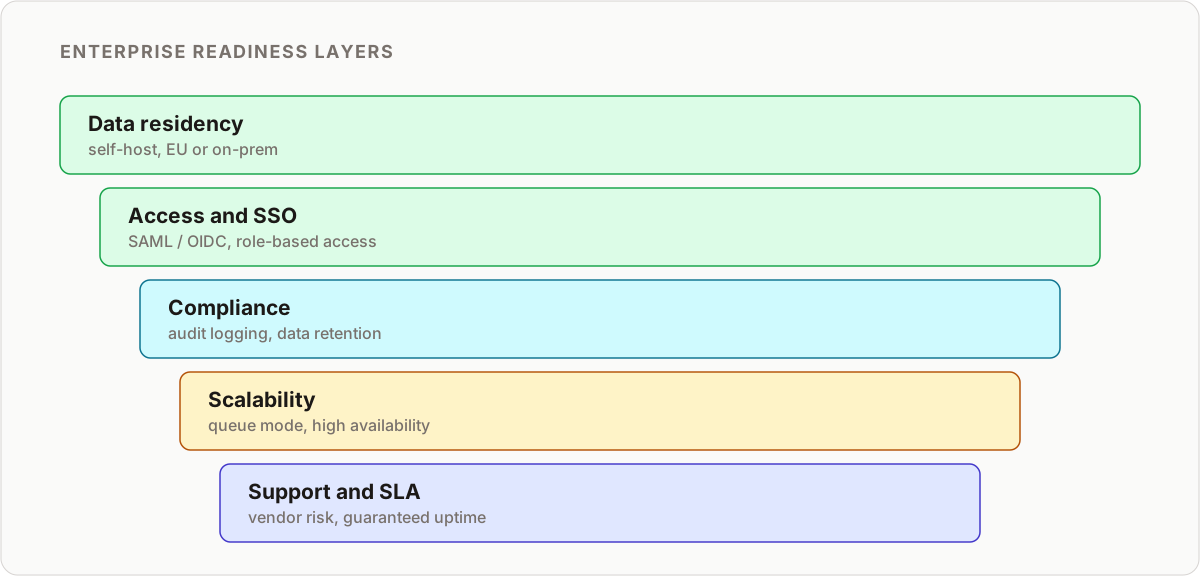
The enterprise decision rarely turns on which builder feels nicer. It turns on six questions a platform review will always ask. Here is how the two tools compare on each.
| Enterprise concern | n8n (self-hosted) | Make (managed cloud) |
|---|---|---|
| Self-hosting and data residency | Full control: on-prem, private cloud, or locked-down VPC; data never leaves your perimeter | Cloud-only; all data processed on Make’s servers and regions |
| Security and SSO | SAML/OIDC SSO, plus optional OAuth2 reverse proxy at the network edge | SSO on higher tiers, within the access model Make exposes |
| Compliance posture | You own audit logs, encryption at rest, and access policy end to end | You inherit Make’s certifications; less granular control by design |
| Scalability | Queue mode with Redis-backed workers scales horizontally | Scaling handled inside Make’s infrastructure; no visibility or tuning |
| Cost at scale | Fixed infrastructure cost, unlimited executions self-hosted | Per-operation and data-transfer pricing that grows with usage |
| Support model | Community edition plus commercial enterprise support; you own the stack | Vendor SLA; you rely on Make for uptime and incident response |
Read down the “enterprise concern” column and the pattern is clear: n8n trades convenience for control, and at enterprise scale control is what you are buying.
The core difference: visual simplicity vs uncapped power
Make’s greatest strength is its intuitive, visual-first interface. It excels at empowering marketing and ops teams to build automations quickly, and for straightforward, linear processes it is genuinely one of the best tools on the market. That same simplicity becomes a ceiling at enterprise scale, where complex integrations, custom auth flows, and conditional business logic often need real code that a visual-only builder cannot express.
n8n, by contrast, is a developer’s tool first. You can execute native JavaScript and Python directly inside a workflow, which means you are never limited to pre-built connectors. If a system has an API you can integrate with it, and if it does not, you can usually still find a way in. This is what unlocks bespoke, mission-critical enterprise automation that matches your actual business processes instead of forcing them into a vendor’s model.
That flexibility cuts both ways, and it is worth being honest about it. n8n gives you enough rope to build something fragile if you are careless. The discipline that keeps a code-capable platform reliable at scale is a real workstream, which is why we treat it as one: see our guide to bulletproof n8n reliability for the error-handling, retry, and monitoring patterns that keep self-hosted automation dependable.
Deploying at enterprise scale: queue mode and high availability
A single n8n instance handling everything is fine for a small team. It is not an enterprise architecture.
n8n’s queue mode splits the platform into a main process (handling the UI and webhook triggers) and a pool of separate worker processes that actually execute workflows, coordinated through Redis and backed by Postgres for persistent state. This matters for two reasons.
- Horizontal scaling. When execution volume grows, you add worker containers. You do not re-architect anything, and you do not hit a plan ceiling.
- Resilience. A slow or crashing workflow in one worker does not take down the webhook endpoints other systems depend on. Failures stay contained.
Make gives you none of this to configure, because you are not supposed to need to. All of that scaling happens inside their infrastructure, which is exactly the point of a managed platform, and exactly why you have no visibility or control over it. When a workflow slows down on Make, you file a ticket. When one slows down on self-hosted n8n, you read your own logs and metrics and fix it.
Identity, access, and audit trails
Enterprise procurement asks the same three questions regardless of vendor: can we enforce our SSO, can we restrict who edits what, and can we prove what happened after the fact.
On self-hosted n8n, all three are configuration, not compromise.
- SSO. SAML or OIDC integrates with your existing identity provider, so nobody manages a separate n8n password and offboarding is a single action in your IdP.
- Role-based access control. RBAC limits who can create, edit, or only view workflows, with editor access reserved for a trusted group rather than handed out by default.
- Network-edge enforcement. A reverse proxy running an OAuth2 gateway in front of n8n adds a second enforcement layer before a request even reaches the application.
- Audit logging. Structured logs shipped to your existing SIEM give you the trail a security team will ask for during an incident review or an annual audit.
Make offers elements of this on its higher tiers, but you work within the access model it has decided to expose, not one you control end to end. If you are standing up self-hosted n8n, harden it before it touches production data; our n8n security audit guide walks through the exact checks, from credential handling to reverse-proxy config, that a review will scrutinize.
The deciding factor: total cost of ownership at scale
This is where the difference becomes stark.
Make runs on a tiered subscription with usage-based limits on both operations and data transfer. At enterprise volume, that model is a genuine liability: costs scale with success, and hard transfer limits become a hidden bottleneck exactly when a process starts mattering more. You end up rationing automation to protect a budget, which defeats the purpose of automating in the first place.
n8n’s fair-code model is dramatically more enterprise-friendly. Self-hosting the open-source Community Edition means unlimited executions and data transfer for a fixed infrastructure cost. At tens of thousands of operations a month, Make commonly runs into the thousands of dollars monthly. A queue-mode n8n cluster handling the same volume typically costs a few hundred dollars a month in servers, and that gap only widens as volume grows, because n8n’s cost is driven by infrastructure, not by how many operations you happen to run through it.
Two caveats keep this honest. First, self-hosting shifts cost from a subscription line to an engineering line: you own patching, upgrades, and uptime, so factor in staff time or a support contract. Second, n8n’s commercial enterprise tier adds paid features and support on top of the free core if you want them. Even accounting for both, the TCO curve favors n8n once volume is meaningful, because the cost stops tracking usage.
Security and data control: the self-hosting advantage
For any enterprise operating under GDPR, HIPAA, or SOC 2, data control is not a nice-to-have. It is the whole conversation.
Make, as a fully managed cloud platform, processes all of your data on its servers. For legal and security teams at regulated organizations, that alone can end the discussion before pricing even comes up.
Self-hosting n8n on your own infrastructure, whether on-premises, in a private cloud, or on a locked-down VPC, is the platform’s real enterprise feature. It means:
- Sensitive business and customer data never leaves a perimeter you control.
- On-prem agents can reach legacy internal systems that would never be exposed to a third-party cloud.
- Air-gapped deployment is possible when a regulator genuinely requires it.
None of this makes you compliant by itself. You still need the access control, encryption, and logging work described above. But it is the precondition that makes the rest of that work possible at all. You cannot bolt data residency onto a cloud-only platform; you either control the infrastructure or you do not.
Support, SLAs, and vendor risk
Managed platforms sell peace of mind, and that is a legitimate thing to buy. With Make, uptime and incident response are the vendor’s problem, backed by a contractual SLA. When something breaks at 2am, you are not the one paged. For a lean team with no platform engineers, that is worth real money.
Self-hosting inverts the trade. With n8n you own uptime, which means you own the on-call rotation, the patch cadence, and the recovery plan. In exchange you get something a managed platform can never offer: there is no single vendor whose pricing changes, whose region goes down, or whose roadmap quietly deprecates the connector your business depends on. Open-source n8n cannot be taken away from you, and n8n’s commercial enterprise support contract is available if you want a vendor to lean on without giving up that control.
The right lens here is vendor risk, not just convenience. On Make, your automation layer is only as durable as your relationship with one company. On self-hosted n8n, the platform is yours to run for as long as you choose, on terms you set. For a process that becomes load-bearing to the business, that durability is often the quiet reason enterprises pick the self-hosted path even when the managed option looks easier on day one.
What an enterprise n8n deployment actually looks like
In practice, the reference architecture for a regulated deployment looks like this:
- An nginx reverse proxy terminating TLS and enforcing an OAuth2 gateway in front of everything.
- n8n running in queue mode, with Postgres for state and Redis for the job queue.
- A pool of worker containers that scale independently of the main process.
- Structured logs forwarded to a SIEM for retention and alerting.
Nothing here is exotic. It is the same pattern you would use for any production service that handles sensitive data, applied to your automation layer instead of treating it as an afterthought. The lesson enterprises miss is that automation is production infrastructure, and it deserves the same rigor as the rest of the stack.
When Make is still the right call
None of this means Make is the wrong choice for every large organization. A department that needs a working automation today, does not have infrastructure or security review capacity to spare, and is moving data between mainstream SaaS tools with no special compliance burden will get there faster on Make.
The honest advice is to match the tool to the actual constraint:
- If the constraint is time and technical staff, Make wins.
- If the constraint is data control, cost at scale, or workflow complexity, n8n wins.
It is also worth naming the case where neither is the answer. If a process is trivial, one-off, or better served by a native integration, automating it at all can be the wrong move; our note on when not to use n8n covers those traps. And if your comparison is really against Zapier rather than Make, the trade-offs shift again, which we cover in n8n vs Zapier.
Bottom line for enterprise
Make is an excellent choice for departments and smaller organizations that prioritize ease of use for non-technical staff and have predictable, lower-volume automation needs.
For the enterprise, self-hosted n8n is the stronger strategic platform when you need deep customization, face genuinely complex technical requirements, must control costs as volume grows, or have to keep full sovereignty over your data. If any of those apply, and for most enterprises at least one does, the self-hosted route is worth the setup cost. You are trading a monthly bill and a black box for infrastructure you own and can reason about, which is exactly the trade a mature organization should want to make.
Planning a secure, self-hosted n8n platform for your organization? The self-hosting tutorial covers deployment, and the n8n reliability guide covers running it in production.
Frequently asked questions
Is n8n or Make better for enterprise?
For most enterprises with compliance, security, or high-volume requirements, self-hosted n8n is the stronger platform because it gives you data sovereignty, unlimited executions at a fixed cost, and native code inside workflows. Make is better when a team needs a managed, self-serve tool immediately and has no special data-control or scale burden.
Does n8n support single sign-on for enterprise identity providers?
Yes. n8n's enterprise features include SAML and OIDC SSO, so you enforce your existing identity provider (Okta, Azure AD, Google Workspace) instead of managing separate credentials. Self-hosted deployments commonly add an OAuth2 reverse proxy in front of n8n as an extra network-edge enforcement layer.
Can n8n run in a high-availability, horizontally scaled configuration?
Yes. Queue mode splits n8n into a main process and separate worker processes coordinated through Redis and backed by Postgres for persistent state. Workers scale horizontally, so you add capacity by adding containers rather than upgrading a single server.
Is self-hosted n8n suitable for HIPAA, GDPR, or SOC 2 compliance?
Self-hosting is what makes that conversation possible at all, because your data never leaves infrastructure you control. It does not make you compliant automatically. You still need audit logging, access control, encryption at rest, and a documented security process layered on top.
What does enterprise n8n TCO look like compared to Make at high volume?
At tens of thousands of operations a month, Make's per-operation pricing commonly runs into the thousands of dollars monthly. A self-hosted n8n queue-mode cluster handling the same volume typically costs a few hundred dollars a month in infrastructure, and that cost stays roughly flat as volume grows.
Can Make be self-hosted for data residency?
No. Make is a fully managed cloud platform, so all workflow data is processed on its servers in its regions. If your requirement is that sensitive data never leaves infrastructure you control, self-hosted n8n is the only one of the two that can meet it.
Does n8n offer a managed cloud option like Make?
Yes. n8n Cloud is a hosted option if you want managed convenience, but it gives up the data-residency and cost-at-scale advantages that make self-hosting compelling for enterprise. Most regulated buyers choose self-hosted n8n specifically to keep data in their own perimeter.
How hard is it to migrate enterprise workflows from Make to n8n?
There is no one-click importer, so migration is a rebuild rather than a conversion. Plan to re-model workflows around n8n's node and code model, re-establish credentials in n8n's credential store, and validate each flow before cutover. The payoff is lower long-term cost and full control; budget engineering time for the transition.
Related reading
Keep learning
Step-by-step n8n tutorials, and free templates you can import and adapt.
Browse tutorials →Browse templates