

On this page
You make n8n workflows reliable in production by layering four things: a global error workflow that alerts on every failure, per-node retries with exponential backoff for transient errors, idempotency checks before any side effect so retries are safe, and external monitoring that catches an outage before your customers do. Run the instance in queue mode with a real database so executions survive restarts. Do those five things well and silent 3 AM failures stop happening.
That is the whole answer. The rest of this guide is the how: the exact patterns, node settings, and infrastructure decisions that turn brittle hobby workflows into production n8n you can trust with money and client relationships. This is a deep guide, so use the sections below as a reference and jump to what you need.
The reliability stack: five layers
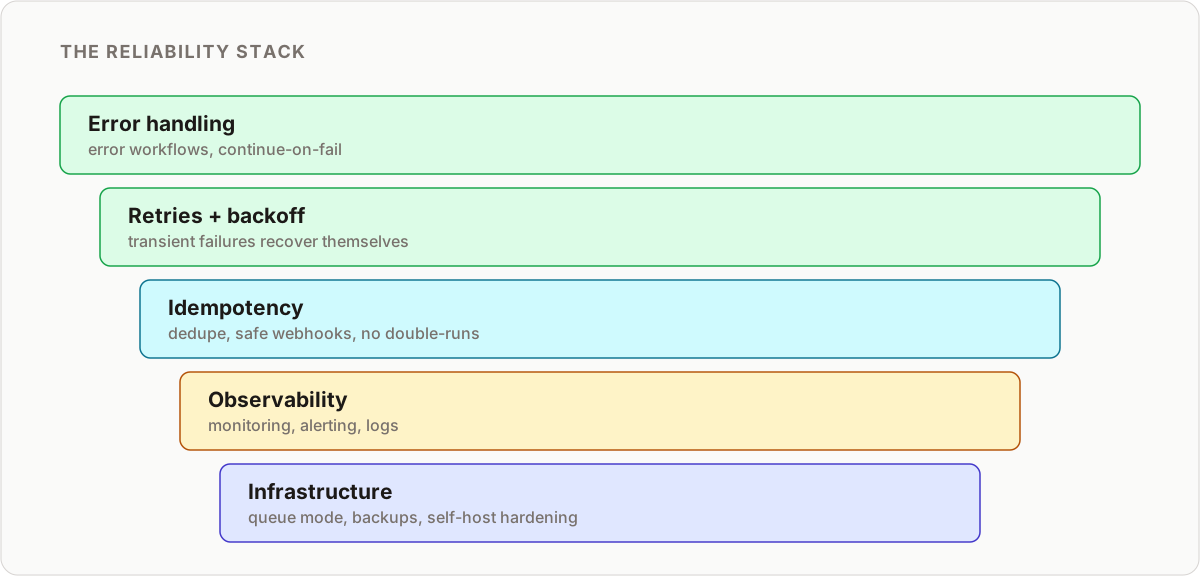
Reliable n8n workflows are not one trick, they are a stack. Each layer catches a different class of failure, and skipping one leaves a hole the others cannot cover.
| Layer | Problem it solves | Core mechanism |
|---|---|---|
| Error handling | A failure goes unnoticed or aborts everything | Global Error Trigger workflow plus Continue On Fail branches |
| Retries and backoff | Transient network and rate-limit errors | Node-level Retry On Fail with increasing wait |
| Idempotency | Retries and duplicate triggers cause duplicate side effects | Unique-ID dedupe before every action |
| Infrastructure | Restarts lose executions, UI blocks throughput | Queue mode, Postgres, workers, backups |
| Observability | You do not know it broke | Heartbeat, alerting, execution logging, metrics |
Work through them in that order. There is no point scaling to twenty workers if a duplicated webhook still creates duplicate customers.
Layer 1: Error handling that actually catches failures
The default n8n behavior on a failed node is to stop the execution and mark it errored. On a manual test that is fine. In production, nobody is watching the executions list at 3 AM, so a stopped execution is a silent failure. Good n8n error handling means every failure is caught, routed, and announced.
The global error workflow
Build one dedicated workflow that starts with an Error Trigger node. n8n fires this automatically whenever any workflow that references it fails. Inside, do three things:
- Format the error: capture the workflow name, execution ID, failed node, and error message from the trigger payload.
- Alert a human: send it to Slack, email, or an on-call tool so it cannot be ignored.
- Log it: append the failure to a central database table or n8n data table for later analysis.
Then set this workflow as the error workflow in each production workflow’s settings. Configure error handling once, benefit everywhere. This is the single highest-leverage reliability change you can make, and it is the foundation the rest of this guide builds on. For a full walkthrough with the node-by-node build, see our guide to n8n error handling and the deeper production-grade error handler.
Continue On Fail for graceful recovery
The global error workflow handles total failures. But sometimes you do not want a single node failure to abort the run, you want to catch it and take a different path. That is n8n’s equivalent of try/catch.
Enable Continue On Fail on the node that might error (typically an HTTP Request or an external API node). When it fails, execution continues instead of stopping, and the item carries an error field. Immediately after, add an IF node that checks for that error field and routes accordingly: retry, use a fallback value, write to a dead-letter table, or notify and skip.
Use Continue On Fail deliberately, not everywhere. It is right when a partial result is better than none, for example processing 100 leads and logging the 3 that failed rather than losing all 100. It is wrong when downstream steps assume the failed step succeeded, because you will just move the failure somewhere harder to debug.
Dead-letter pattern
For anything you cannot afford to lose, write failed items to a dedicated “dead-letter” table with the original payload and the error. A small scheduled workflow can retry the dead-letter queue later or surface it for manual review. This is how you avoid the choice between “abort everything” and “drop the item silently”.
Layer 2: Retries and exponential backoff
Most production failures are transient: a timeout, a brief rate limit, a momentary 503. Retrying fixes them without a human ever being involved, and it stops your error workflow from crying wolf.
n8n has retries built into every node. In node settings, enable Retry On Fail and configure:
- Max Tries: 3 to 5 is a sane default. Beyond that you are usually masking a real problem.
- Wait Between Tries: increase this so you back off instead of hammering a service that is already struggling. A fixed short wait can turn one failure into a thundering-herd of retries.
n8n’s built-in wait is a fixed interval. For true exponential backoff (wait 1s, then 2s, then 4s, then 8s), build an explicit retry loop: a counter stored on the item, an IF node checking attempts against a max, and a Wait node whose duration is an expression based on the attempt number. This matters most against APIs that return 429 Too Many Requests, where honoring backoff is the difference between recovering and getting your key throttled harder.
Two rules keep retries safe:
- Only retry idempotent operations. Retrying a “create charge” call without an idempotency key can double-charge a customer. See Layer 3.
- Respect rate limits and timeouts. Set an explicit timeout on every HTTP Request node so a hung connection fails fast enough to retry within your window, rather than blocking the execution indefinitely.
Layer 3: Idempotency, the pattern that makes retries safe
Idempotency means running an operation multiple times has the same effect as running it once. It is the pattern that makes every other layer safe, because retries, duplicate webhooks, and replayed events all become harmless.
The scenario: a webhook triggers a workflow that creates a customer. The sender does not get your 200 response in time, so it retries. Now the webhook fires twice and you have a duplicate customer, a duplicate charge, or a duplicate email. Idempotency prevents all of it.
The pattern
- Extract a unique identifier from the trigger. Real events almost always have one: a Stripe event ID, an order number, a message ID, a row primary key.
- Check whether you have already processed it. Query a database, an n8n data table, or a cache for that ID.
- Skip if seen. If the ID exists, stop or route to a no-op branch. If not, do the work and record the ID.
Record the ID in the same transaction as the action wherever possible, so a crash between “act” and “record” does not leave you able to re-process.
Webhook safety
Webhook idempotency deserves special care because senders retry aggressively:
- Respond fast. Return
200as soon as you have safely queued or recorded the event, before heavy processing. Slow responses trigger sender retries. - Verify signatures. For providers like Stripe, verify the webhook signature so you only process authentic events.
- Dedupe on the provider’s event ID, not on your own generated value, because that is the ID the provider reuses across retries.
We cover the full implementation, including the Stripe signature and dedupe store, in the webhook idempotency with Stripe and n8n guide.
Layer 4: Infrastructure for production n8n
The best workflow logic still fails if the instance underneath it is fragile. Two infrastructure decisions separate a hobby setup from production n8n.
Use a real database
The default SQLite database is fine for testing and terrible for production. Move to Postgres before you have meaningful load. It handles concurrent executions, survives better under pressure, and is straightforward to back up. This is not optional for a reliable instance.
Queue mode and horizontal scaling
By default, n8n runs everything in one process, so execution competes with the editor UI and a restart can interrupt running jobs. Queue mode fixes this:
- A main process handles triggers, webhooks, and the UI.
- One or more worker processes pull jobs from a Redis queue and execute them.
- Executions are decoupled from the UI, survive a main-process restart, and scale by adding workers.
Any instance running meaningful volume, long-running jobs, or concurrent executions should be in queue mode. It is the clearest single upgrade from “works on my machine” to reliable n8n workflows at scale.
Modular design keeps complexity survivable
A 100-node monolith is impossible to debug when it fails at node 74. Break large processes into focused child workflows called via the Execute Workflow node: one for “Lead Enrichment”, one for “Report Formatting”, one for “Customer Onboarding”. Smaller workflows are easier to test in isolation, reuse across projects, and reason about when something breaks.
State management for long-running workflows
Long processes are exposed to restarts and timeouts. For any multi-step job, checkpoint state externally at each critical stage (a database or n8n data table), and have the workflow check for saved state on start. If state exists, resume from the last completed step instead of starting over. Combined with idempotency, this means an interruption costs you a resume, not a rerun.
Self-hosting hardening basics
Reliability and security overlap: a compromised or misconfigured instance is not a reliable one. The essentials:
- Set the encryption key (
N8N_ENCRYPTION_KEY) explicitly and back it up separately. Without it you cannot decrypt exported credentials. - Enforce HTTPS and put n8n behind a reverse proxy with proper TLS.
- Lock down auth, use strong owner credentials, and restrict who can reach the editor.
- Patch promptly. n8n has shipped critical CVEs; stay current. See our roundup of critical n8n CVEs and the full n8n security audit guide.
Backups you have actually tested
Two layers of backup:
- Database backups on a schedule (automated
pg_dumpor managed snapshots) covering executions, credentials, and settings. - Workflows in Git. Export workflows via the n8n CLI into a version-controlled repository so you have reviewable, revertible history independent of the database.
A backup you have never restored is a hope, not a backup. Periodically restore into a scratch instance to confirm it works and that you still hold the encryption key.
Layer 5: Monitoring, alerting, and observability
You cannot fix what you cannot see. Reliability that is not observable is just luck that has not run out yet. Run three complementary layers of observability.
- Heartbeat. A scheduled workflow that pings an external uptime service (a dead-man’s-switch style check). If the ping stops, the external service alerts you that the whole instance is down, something no internal workflow could tell you.
- Failure alerting. Your global error workflow (Layer 1) pushes every failure to Slack or email in real time, with enough context to triage without opening the UI.
- Execution logging and metrics. Log the outcome of each critical execution to a central table for trend analysis, and scrape n8n’s Prometheus metrics endpoint into Grafana for dashboards on execution volume, failure rate, and queue depth. Alert on rate-of-failure, not just single failures, so a slow degradation is caught early.
The goal is a hard number: time to detection. If a critical workflow fails, how many minutes until you know? If the honest answer is “whenever a customer complains”, you have monitoring to build.
Testing and staging
Never edit live production workflows directly. Build and test changes somewhere safe, then promote them.
- Separate staging instance with its own credentials and test data, mirroring production config (including queue mode) so behavior matches.
- Pin sample data on trigger nodes to replay real payloads and re-run repeatably without waiting for live events.
- Test the error paths, not just the happy path. Force a node to fail and confirm the error workflow fires, the retry backs off, and the idempotency check holds.
- Promote via version control: export tested workflows and import them, or use Git-based workflows, so what runs in production is a reviewed, known version.
Part of reliability is also knowing when n8n is the wrong tool for a job. Some workloads belong in dedicated code or infrastructure; our take on when not to use n8n helps you avoid forcing reliability onto a workflow that should never have been a workflow.
Failure modes and mitigations
A quick reference for the failures that actually take down production n8n.
| Failure mode | Symptom | Mitigation |
|---|---|---|
| Silent node failure | Execution stopped, nobody notified | Global Error Trigger workflow with Slack/email alert |
| Transient API error | Intermittent 5xx or timeout aborts run | Retry On Fail with exponential backoff |
| Rate limiting | 429 responses, key throttled | Backoff, respect limits, batch with SplitInBatches |
| Duplicate webhook | Duplicate records or charges | Idempotency check on provider event ID |
| Main process restart | Running executions lost | Queue mode with workers and Redis |
| Long job interrupted | Restarts from scratch | External state checkpointing plus idempotency |
| Instance down | Everything silently stops | External heartbeat and uptime monitor |
| Bad deploy | Broken workflow live | Staging instance plus versioned promotion |
| Lost data or config | Unrecoverable after failure | Postgres backups plus Git-exported workflows |
Production-readiness checklist
Copy this and run it before you call any workflow production-ready.
n8n PRODUCTION READINESS CHECKLIST

Error handling
[ ] Global error workflow with Error Trigger node exists
[ ] Every production workflow points to it in settings
[ ] Alerts go to a channel a human watches
[ ] Failures are logged to a central table
[ ] Continue On Fail + IF used where partial results beat aborting
[ ] Dead-letter path for must-not-lose items

Retries and limits
[ ] Retry On Fail enabled on external-service nodes
[ ] Max tries and increasing wait configured (backoff)
[ ] Explicit timeout set on every HTTP Request node
[ ] Only idempotent operations are retried

Idempotency
[ ] Unique ID extracted from every trigger
[ ] Dedupe check before any side effect
[ ] Webhooks respond 200 fast, before heavy work
[ ] Webhook signatures verified where available

Infrastructure
[ ] Postgres, not SQLite
[ ] Queue mode with workers + Redis for real load
[ ] Large flows split into child workflows
[ ] Long jobs checkpoint state externally
[ ] Encryption key set and backed up separately
[ ] HTTPS, strong auth, patched to latest

Backups
[ ] Automated database backups on a schedule
[ ] Workflows exported to Git
[ ] Restore tested at least once

Observability
[ ] Heartbeat workflow pinging an external uptime service
[ ] Prometheus metrics scraped / dashboarded
[ ] Alerting on failure rate, not just single failures
[ ] Known time-to-detection for a critical failure

Testing
[ ] Separate staging instance
[ ] Sample data pinned for repeatable runs
[ ] Error paths tested, not just happy path
[ ] Changes promoted via version control, never edited live
Key takeaways
- Reliability is a stack, not a trick. Error handling, retries, idempotency, infrastructure, and observability each cover a failure class the others cannot.
- Idempotency is the keystone. It makes retries and duplicate triggers harmless, so build it into every workflow that has a side effect.
- One global error workflow beats scattered handling: configure alerting and logging once, benefit across the whole instance.
- Queue mode plus Postgres is the line between hobby and production n8n. Cross it before you scale.
- If you cannot see a failure within minutes, it is not reliable, it is lucky. Monitor the instance, the failures, and the failure rate.
Reliability is not an accident, it is deliberate design applied layer by layer. Work down the checklist and the 3 AM silent failure stops being a fear and becomes a caught, alerted, and retried non-event.
Next step: put the error-handling layer into practice with the advanced error handling tutorial.
Frequently asked questions
How do you make n8n workflows reliable in production?
Layer four things: a global Error Trigger workflow that alerts on every failure, per-node retries with exponential backoff for transient errors, idempotency checks before any side effect so retries are safe, and external monitoring that pings your instance and your critical flows. Run n8n in queue mode with a real database so executions survive restarts.
What is the best way to handle errors in n8n?
Use a single dedicated workflow triggered by the Error Trigger node for centralized alerting and logging, then add Continue On Fail plus an IF node on individual nodes where you want a custom recovery path instead of aborting the whole run. Configure retries at the node level for transient failures so the error workflow only fires on genuine problems.
How do I stop n8n from creating duplicate records when a webhook fires twice?
Make the workflow idempotent. Take a unique identifier from the payload (a Stripe event ID, an order number, a message ID), check whether you have already processed it in a database or n8n data table, and skip the action if you have. Respond 200 to the webhook immediately so the sender does not retry.
What is n8n queue mode and do I need it in production?
Queue mode runs a main process plus one or more worker processes that pull jobs from a Redis queue. It decouples execution from the editor UI, lets you scale by adding workers, and keeps executions running if the main process restarts. Any production instance handling meaningful volume or long-running jobs should use it.
How should I configure retries in n8n?
Enable Retry On Fail on nodes that call external services, set a sensible max attempts (3 to 5), and increase the wait between tries so you back off instead of hammering a struggling API. Only retry idempotent operations, otherwise a retry can double-charge or double-send.
How do I monitor an n8n instance so I know when it breaks?
Run three layers: a heartbeat workflow that pings an external uptime service on a schedule, the global error workflow that pushes failures to Slack or email, and execution logging to a central table or metrics endpoint. n8n also exposes Prometheus metrics you can scrape into Grafana for dashboards and alerts.
Should I test n8n workflows before deploying to production?
Yes. Keep a separate staging instance with its own credentials and test data, pin sample input data on trigger nodes to replay real payloads, and validate error paths, not just the happy path. Never edit live production workflows directly, promote tested versions through version control or export and import.
How do I back up n8n workflows and credentials?
Back up the underlying database (Postgres for production) on a schedule, and additionally export workflows to a Git repository using the n8n CLI so you have versioned, reviewable history. Store the encryption key securely and separately, because without it exported credentials cannot be decrypted.
Related reading
Keep learning
Step-by-step n8n tutorials, and free templates you can import and adapt.
Browse tutorials →Browse templates