

On this page
Claude Code builds n8n workflows by first generating a PRD you approve, then constructing the workflow node by node, executing and self-correcting each node against live APIs before moving to the next. That two-phase approach turns a plain-English request like “scrape leads from Google Maps and enrich them with email addresses” into a tested, deployed n8n workflow in roughly 10 to 15 minutes instead of hours.
The barrier to complex workflow automation just collapsed. Imagine describing what you need in plain English and watching an AI agent build your entire n8n workflow, node by node, tested and deployed, without you wiring a single connection by hand.
This isn’t speculative fiction. Recent research from ability.ai reveals a fundamental shift in how operational teams deploy AI infrastructure. We’re moving from a world where humans painstakingly wire together low-code nodes to one where AI agents architect, test, and deploy complete workflows autonomously.
The key technology? Claude Code, Anthropic’s autonomous coding agent, integrated with n8n’s workflow automation platform. For businesses drowning in manual processes, this represents a massive acceleration in time-to-value. But it also introduces new requirements for technical oversight and governance.
Here’s what you need to know to implement self-building workflows in your own environment.
The Paradigm Shift: From Low-Code to AI-Built Low-Code
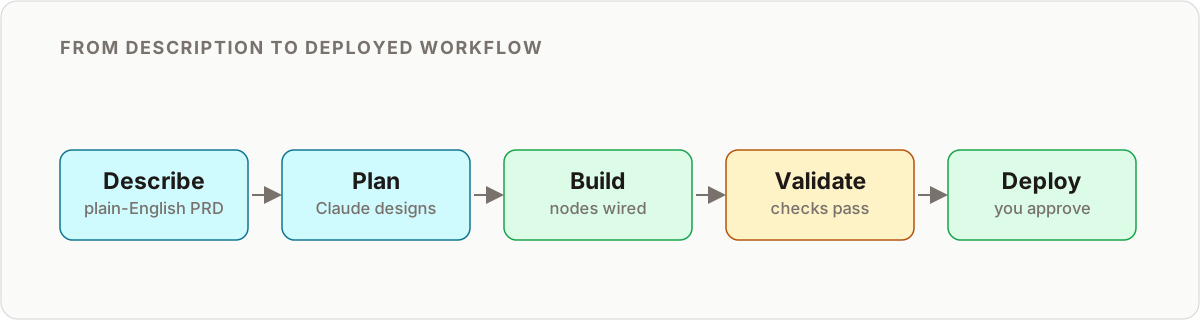
For years, the automation community debated a binary choice: should we use code (Python/Node.js) for flexibility, or low-code tools (n8n/Make) for observability?
The emergence of Claude Code renders this debate obsolete. The most effective strategy is now using AI coding agents to build low-code infrastructure.
Why? Because each tool excels at different things:
- Claude Code is brilliant at understanding complex requirements, navigating API documentation, writing JavaScript transformations, and iterating on logic
- n8n is superior for deploying deterministic systems that non-developers can visualize, debug, and maintain over time
The breakthrough is that you no longer need to manually build the n8n workflow. You can treat Claude Code as a technical architect that constructs the n8n system for you. The AI handles the technical heavy lifting of API connections and data transformation, while the low-code platform provides the governance layer and operational stability required for production systems.
This creates a powerful symbiotic relationship: AI for construction, low-code for governance.
The Two-Phase Architecture: Why Structure Prevents Hallucination
Here’s the critical insight that separates successful implementations from failures: you cannot simply tell an AI to “build a lead gen bot” and expect good results.
Without a structured plan, the agent will hallucinate ineffective workflows, configure nodes incorrectly, or get stuck in validation error loops. The solution is a two-phase architecture that mirrors how senior engineers actually work. It is the same separation of concerns you see across mature n8n AI agent designs: plan first, execute second.
| Phase | Input | What Claude Code produces | Human gate |
|---|---|---|---|
| Phase 1: PRD Generator | Discovery-call transcript or written spec | A structured Product Requirement Document defining sources, enrichment, error handling, success criteria, and output | You approve the PRD before any node is built |
| Phase 2: n8n Builder | The approved PRD | A live workflow built node by node in your n8n instance, each node tested against real data | You validate with test data before production |
This clean split is what separates a reliable build from a raw prompt-to-JSON gamble. If you have only ever used single-shot AI workflow generators, the PRD gate is the upgrade that removes most of the failure modes.
Phase 1: The PRD Generator
Before a single node is created, the system must generate a Product Requirement Document (PRD). This isn’t bureaucracy, it’s the governance layer that prevents the AI from building the wrong thing efficiently.
In this phase, you feed a raw input, such as a transcript from a discovery call or a written specification, into Claude Code. A specialized “PRD Generator Skill” analyzes your input and systematically defines:
- Source verification: Where should data come from? (e.g., Google Maps API, CRM webhooks)
- Enrichment logic: What specific data points are needed? (e.g., email addresses via FullEnrich, company size via Clearbit)
- Error handling: Where should alerts go if the automation fails?
- Success criteria: How are leads qualified and scored?
- Output destination: Where does the final data land? (Google Sheets, CRM, Slack)
This planning phase enforces governance. It ensures the agent understands the business logic and technical constraints before attempting implementation. A properly structured PRD might look like this:
## Workflow: Medical Equipment Lead Generation

**Objective**: Scrape medical equipment suppliers from Google Maps,
enrich with email data, and deliver qualified leads to sales team.

**Data Flow**:
1. Input: Google Maps search query ("medical equipment suppliers NYC")
2. Scrape: Extract business name, address, phone, website
3. Filter: Only businesses with websites
4. Enrich: Use FullEnrich API to find decision-maker emails
5. Qualify: Score leads based on website quality signals
6. Output: High-scoring leads to Google Sheets, notifications to Slack

**Error Handling**:
- If enrichment fails: Log error, continue with next lead
- If quota exceeded: Send alert to ops-alerts Slack channel
- If no results: Send summary notification after 24 hours

**Success Metrics**:
- Target: 50+ qualified leads per run
- Enrichment success rate: >70%
- False positive rate: <15%
Once the PRD is approved (by you, the human), Phase 2 begins.
Phase 2: The n8n Builder Skill
This is where the magic happens. The n8n Builder Skill is not a text-generation task, it’s an active engineering task.
Claude Code connects directly to your n8n instance via the n8n API. Critically, it doesn’t just paste a massive JSON file and hope for the best. Instead, it builds the workflow incrementally, node by node, using a methodology that mimics how senior engineers actually work.
The n8n-skills repository on GitHub provides seven complementary skills that teach Claude Code:
- Correct n8n expression syntax (
{{$json.body}}patterns) - How to use the n8n MCP (Model Context Protocol) tools effectively (see our n8n MCP setup guide for Claude Code and the wider list of MCP servers for n8n)
- Proven workflow patterns from 2,653+ real-world templates
- Validation error interpretation and fixing
- Operation-aware node configuration
These skills compose seamlessly. When Claude Code needs to build a workflow, it automatically activates the relevant skills to guide the construction process.
Real-Time Testing: The Secret to Reliability
What separates this approach from standard LLM code generation is the agent’s ability to execute and verify its work in real-time. This is the innovation that makes self-building workflows production-ready instead of just impressive demos.
Here’s how the testing methodology works:
1. Sequential Construction
The agent adds one node at a time. For example, it might start with a Google Maps scraper node.
2. Immediate Execution
After adding the node, it immediately executes that specific node to verify it returns data. This isn’t a dry run, it’s hitting the actual API with test parameters.
3. Self-Correction
If the node fails, the agent reads the error message, analyzes what went wrong, adjusts the configuration, and tries again. For instance:
// Initial attempt - fails because of missing authentication
{
  "nodeType": "n8n-nodes-base.googleMaps",
  "operation": "search",
  "parameters": {
    "query": "medical equipment NYC"
  }
}

// Error: "Missing credentials"
// Agent adds credential reference

{
  "nodeType": "n8n-nodes-base.googleMaps",
  "operation": "search",
  "credentials": "googleMapsApi",
  "parameters": {
    "query": "medical equipment NYC"
  }
}
4. Progression
Only after a node is verified does the agent move to the next step (e.g., adding a Loop node to process multiple results, or a Code node for custom transformation).
This incremental testing prevents the “cascade of errors” that plague AI-generated code. By validating each step before proceeding, the agent catches configuration mistakes early when they’re easy to fix, not after the entire workflow is built.
In real-world testing documented by ability.ai, Claude Code successfully navigated from scraping leads to enriching them with email addresses, creating sophisticated loop structures that processed items one by one rather than crashing on bulk data, all while self-correcting errors along the way.
Solving the Credentials Problem at Scale
A major friction point in automated workflow construction is authentication. How do you give an AI agent access to dozens of API keys without creating a security nightmare or manually pasting credentials into every conversation?
The solution is elegant: the Credentials Template approach.
How It Works
- Create a template workflow in n8n containing representative nodes for all your commonly-used services (OpenAI, Google Sheets, Slack, Apify, FullEnrich, etc.)
- Configure credentials for each node once, using n8n’s built-in credential management
- Grant Claude Code access to reference this template workflow
- Inheritance model: When the agent builds a new workflow, it references the template to inherit authenticated connections
Example template structure:
Template Workflow: "Credentials Reference"
├── OpenAI node (configured with your API key)
├── Google Sheets node (OAuth2 authenticated)
├── Slack node (Bot token configured)
├── Apify node (API token configured)
└── FullEnrich node (API key configured)
When Claude Code needs to create a new workflow that uses OpenAI and Slack, it simply references the credential IDs from your template. You never paste API keys into the chat. The agent never sees your raw credentials.
This approach allows you to scale rapidly, deploy ten different autonomous agents building different workflows without ever re-authenticating your software stack.
The “Dangerous Mode” Tradeoff: Speed vs. Safety
Despite the impressive speed, often going from prompt to working automation in 10-15 minutes, this is not yet a “set and forget” magic bullet. There’s an important tradeoff to understand.
What is Dangerous Mode?
To function efficiently, Claude Code requires “Dangerous Mode” to be enabled in your environment. This bypasses permission checks for every file edit or terminal command, allowing the agent to iterate rapidly without constantly asking for approval.
The speed benefit is real: What might take 30 approvals in standard mode happens automatically, cutting development time by 60-80%.
The risk is also real: The agent can execute commands without human review. While Claude Code has safety guardrails built in, dangerous mode requires a trusted environment.
Practical Guidelines
Use dangerous mode when:
- Working in an isolated development environment (Docker container, dedicated VM)
- Building non-production workflows for testing
- You’re actively monitoring the agent’s actions
- The worst-case scenario is “I rebuild the workflow”
Require human approval when:
- Deploying to production environments
- Working with sensitive data or credentials
- Making changes to live, business-critical workflows
- Integrating with systems that have financial implications (payment processors, inventory management)
When AI Still Needs Help
Even in dangerous mode with full autonomy, Claude Code isn’t infallible. Research from ability.ai documents specific failure modes:
Niche APIs: When working with lesser-known services that have limited documentation, the agent may misconfigure parameters. In one test case, the agent failed to correctly implement the FullEnrich API because it lacked specific context about required headers.
Solution: The human operator had to intervene, locate the official API documentation URL, and feed it to the agent. After receiving the correct documentation, Claude Code self-corrected and completed the integration.
Missing context: If your business logic includes edge cases or domain-specific rules not captured in the PRD, the agent will implement the literal requirements without understanding the implicit context.
Solution: Validate the workflow with real test data before deploying to production. Review the execution logs to ensure the logic handles your actual business scenarios.
This validates what ability.ai calls the “pilot mindset”: The AI is the engine, but you are the pilot. The agent builds fast, but you steer the ship, providing course corrections when the logic drifts.
Practical Implementation: Step-by-Step Setup
Ready to implement self-building workflows? Here’s your practical roadmap:
1. Environment Setup
Prerequisites:
- Node.js 18+ installed
- n8n instance (self-hosted or cloud)
- Claude Code installed via CLI
- VS Code or compatible terminal
# Install n8n (if self-hosting)
npm install -g n8n

# Start n8n
n8n start

# Install Claude Code
npm install -g @anthropic-ai/claude-code

# Install n8n-skills for Claude Code
claude-code /plugin install czlonkowski/n8n-skills
2. Configure Your Credentials Template
In n8n:
- Create a new workflow called “Credentials Reference”
- Add nodes for each service you frequently use
- Configure credentials for each node
- Save the workflow but don’t activate it
This becomes your credential repository that all AI-built workflows reference.
3. Write an Effective PRD
Either manually write a PRD or have Claude Code generate one from a transcript:
# In Claude Code
"I need to create a workflow. Here's a transcript of the requirements:
[paste your notes or recording transcript]

Please generate a detailed PRD for this n8n workflow."
Review the PRD carefully. This is your governance checkpoint. Ask yourself:
- Are all data sources clearly defined?
- Are error cases handled?
- Are success metrics measurable?
- Would a human developer understand how to build this?
4. Build the Workflow
Once the PRD is approved:
"Using the approved PRD, build this n8n workflow step by step.
Test each node after creation. Reference credentials from the
'Credentials Reference' template workflow."
Watch as Claude Code:
- Searches for appropriate nodes
- Configures parameters based on the PRD
- Tests each node individually
- Self-corrects errors
- Progresses sequentially through the workflow
5. Validate and Deploy
After Claude Code completes the build:
- Manual testing: Run the workflow with real test data
- Review execution logs: Verify each node produces expected output
- Check error handling: Deliberately trigger error conditions to test fallback logic
- Performance testing: If processing bulk data, verify the workflow handles your expected volume
- Deploy to production: Activate the workflow and monitor initial runs closely
When to Use Human Oversight: The Decision Matrix
Not every workflow needs the same level of human involvement. Here’s a practical decision matrix:
| Workflow Characteristics | Autonomy Level | Human Involvement |
|---|---|---|
| Simple webhook-to-Slack notification | Full autonomy | Review PRD, spot-check final workflow |
| Data enrichment pipeline (API-to-API) | High autonomy | Approve PRD, test with real data |
| CRM integration with conditional logic | Moderate autonomy | Review each phase, approve before execution |
| Financial transaction processing | Low autonomy | Approve every node, extensive testing |
| Customer-facing automated responses | Low autonomy | Review logic and error handling extensively |
General rule: The closer the workflow is to customers or revenue, the more human oversight you need.
The Strategic Implications
For mid-market companies and operations teams, the ability to turn a meeting transcript into functioning automation in minutes is a competitive advantage.
This suggests a future where:
- You don’t buy SaaS for every problem, you deploy sovereign agents to handle specific outcomes
- Your “Sales Development Rep” might be an AI agent, built by another AI agent, running 24/7 on your infrastructure
- Technical literacy shifts from coding to architecture, you don’t need to write Python, but you do need to understand system design, review PRDs, and manage API integrations
However, this capability requires foundational infrastructure:
- Standardize your planning layer: Don’t let teams build AI automations without a PRD phase
- Own your infrastructure: Using tools like n8n ensures that even if AI builds it, you own the logic, data, and logs
- Invest in API literacy: Your team needs to understand authentication, webhooks, and rate limits
As these agents multiply, the durable design question becomes how they are layered. The same PRD-then-build discipline scales into a three-layer agent stack, where planning, execution, and governance are kept as separate, ownable concerns.
Key Takeaways
- Two phases beat one prompt. Claude Code generates a PRD you approve, then builds the n8n workflow node by node. The PRD gate is what stops the agent from building the wrong thing efficiently.
- Real-time testing is the differentiator. The agent executes each node against live APIs and self-corrects before progressing, avoiding the cascade-of-errors problem that breaks one-shot JSON generation.
- Credentials never touch the chat. A pre-authenticated template workflow lets the agent reference credential IDs, so you can scale to many workflows without re-authenticating your stack.
- Dangerous mode is for dev, not production. Enable it in an isolated environment for speed, but require human approval as workflows move closer to customers, revenue, or payments.
- You are the pilot. The agent handles implementation complexity; you own strategic direction, business logic, and quality control.
Conclusion: The Pilot’s Seat
Self-building workflows powered by Claude Code and n8n represent a fundamental shift in how businesses deploy automation. The technology is real, available today, and increasingly accessible.
But this is not autopilot, it’s a sophisticated co-pilot system. The AI handles the implementation complexity that used to require specialized engineering talent. You provide the strategic direction, business logic, and quality control.
The barrier to enterprise-grade automation just collapsed. The question is no longer “can we build this?” but “what should we build first?”
The agents are ready to build. Your job is to point them in the right direction.
Want to implement self-building workflows for your business? Our team specializes in Claude Code + n8n architecture, governance frameworks, and production deployment strategies. Get in touch for a consultation.
Further Resources:
- ability.ai research on Claude Code n8n workflows
- n8n-skills GitHub repository
- n8n MCP server documentation
- Claude Code official documentation
Frequently asked questions
What is dangerous mode in Claude Code and is it safe to use?
Dangerous mode bypasses per-action permission checks so Claude Code can iterate without constant approval prompts, cutting build time significantly. It's appropriate in an isolated development environment where the worst case is rebuilding a workflow, not for anything touching production, credentials, or payments.
Does Claude Code need my n8n API keys to build workflows?
No. The credentials template pattern keeps a pre-authenticated reference workflow in n8n with all your services configured once. Claude Code references those credential IDs when building new workflows, it never sees or handles the raw keys.
How is this different from just asking an LLM to generate workflow JSON?
The two-phase PRD-then-build architecture and real-time node-by-node testing are the difference. A raw JSON dump from an LLM is unvalidated and often subtly broken; Claude Code executes each node against live data as it builds and self-corrects failures before moving forward.
Can Claude Code handle APIs it hasn't seen before?
Mostly, but not perfectly. With niche or poorly documented APIs, it can misconfigure parameters. One documented case required a human to locate the official API docs and feed them back to the agent, after which it self-corrected. Treat it as a capable co-pilot, not a fully autonomous engineer.
How long does it take Claude Code to build an n8n workflow?
Documented runs go from prompt to a working automation in roughly 10 to 15 minutes for a moderate workflow. The bulk of the time is the agent testing and self-correcting each node, not generating text, which is why the output is closer to production-ready than a one-shot JSON dump.
What do I need to set up before Claude Code can build workflows?
Node.js 18 or later, a running n8n instance (self-hosted or cloud), Claude Code installed via CLI, and the n8n-skills plugin. You then create a credentials template workflow once so the agent can reference authenticated services without handling raw keys.
What are the n8n-skills and do I need them?
The n8n-skills repository provides complementary skills that teach Claude Code correct n8n expression syntax, how to use the n8n MCP tools, proven workflow patterns, validation-error fixing, and operation-aware node configuration. They are not strictly required, but they sharply reduce misconfigured nodes and validation loops.
Can I trust Claude Code to deploy directly to production?
Not without a human gate. Use full autonomy for low-stakes workflows like a webhook-to-Slack alert, but require node-level approval and extensive testing for anything touching customers, revenue, or payments. The general rule: the closer the workflow is to money or customers, the more oversight it needs.
Related reading
Still broken?
Send me your workflow JSON and the error you are hitting. I will tell you what is wrong, in writing, within 24 hours. Free, and there is no pitch attached.
Get a free diagnosis →