

On this page
To connect MCP servers to n8n, add an AI Agent node and attach the MCP Client node as one of its tools, then point that node at your MCP server’s URL or command with credentials. The agent discovers every tool the server exposes and calls the right ones at runtime, so you stop wiring a separate branch for each API. This guide covers how MCP works, how to wire it up both ways, a practical pipeline example, and how to keep it safe in production.
What MCP Is and Why n8n Users Should Care
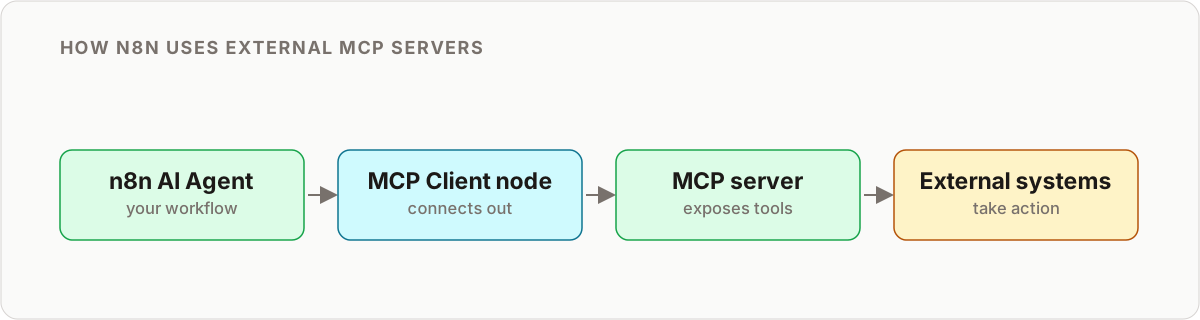
The Model Context Protocol (MCP) is a standard way for AI models to discover and use external tools. Instead of hardcoding every API call, you give an agent access to an MCP server and it figures out which tools to use based on the task in front of it.
The shift matters because your workflow adapts without a rebuild:
- A traditional workflow is trigger, then a hardcoded HTTP Request, then transform, then output.
- An MCP-enabled workflow is trigger, then an AI Agent that selects tools dynamically, then output.
Need to add a new data source? The agent discovers the new tool and starts using it. You do not touch the canvas. If you are new to the agent side of this, the n8n AI agents primer explains how the AI Agent node reasons over tools before you layer MCP on top.
MCP tools in n8n vs. the HTTP Request node
It helps to be precise about what changes. The HTTP Request node is deterministic: you decide the endpoint, method, and payload at build time. MCP tools in n8n are discovered and chosen by the agent at run time. Both have their place. Keep HTTP Request for fixed, high-volume calls where you want zero ambiguity. Reach for MCP when the input or the required tool varies and branching logic is getting out of hand.
The Two Ways n8n Speaks MCP
This is the part most guides miss. n8n sits on both sides of the protocol, and knowing which node does what saves hours.
| Role | Node | What it does | Typical use |
|---|---|---|---|
| Client | MCP Client (tool) | Connects an AI Agent to an external MCP server and calls its tools | Give your agent database, filesystem, GitHub, or cloud tools |
| Server | MCP Server Trigger | Exposes your n8n workflows as tools other MCP clients can call | Let Claude Desktop, Claude Code, or another agent run your workflows |
The n8n MCP Client node is a tool sub-node. You drop it under an AI Agent, and it becomes one connection that surfaces many tools. The MCP Server Trigger flips the direction: your carefully built workflows become callable tools for an outside agent. Teams often run both, using n8n as the central AI hub that consumes tools from some servers while publishing its own workflows as tools to others.
The MCP Server Landscape
You do not have to build servers from scratch. The ecosystem already covers most needs.
Cloud provider servers:
- AWS MCP for S3, Lambda, and DynamoDB access
- Azure MCP for Office 365 and Azure Functions
- Google Cloud MCP for BigQuery, Cloud Functions, and Workspace APIs
Open-source servers:
- Filesystem MCP for local file operations with directory sandboxing
- Database MCP for Postgres, MySQL, and SQLite
- Web MCP for fetching, scraping, and interacting with pages
- GitHub MCP for repositories, issues, and pull requests
Filesystem and database servers are the easiest first targets because they are simple to run locally and the behavior is easy to reason about.
How to Connect MCP to n8n, Step by Step
Here is the practical path to connect MCP to n8n as a client.
- Add an AI Agent node. This is the reasoning node that will decide which tools to call. Give it a model and a clear system prompt describing the job.
- Attach the MCP Client node as a tool. On the AI Agent, add the MCP Client node under the tool connection. One MCP Client connection can expose an entire server’s toolset.
- Point it at the server. Provide the server endpoint (an HTTP or SSE URL for hosted servers, or a command and arguments for a locally launched server) plus any credential.
- Confirm tool discovery. Run the node once. The agent should list the tools the server advertises. If the list is empty, the transport or credentials are usually the cause.
- Start read-only. Restrict the credential to read scopes first so you can watch the agent’s tool choices without risk.
- Grant writes gradually. Once the tool-call history looks sane, widen the scope to the write operations you actually need.
A minimal shape of what the agent holds internally looks like this:
{
  "agent": {
    "model": "claude-sonnet",
    "tools": [
      {
        "type": "mcp",
        "server": "https://your-mcp-server.example.com",
        "auth": "{{ $credentials.mcpServerKey }}"
      }
    ]
  }
}
In the n8n editor you configure this visually rather than by hand, but the concept is the same: one MCP connection, many tools, chosen at runtime. Once it is wired, a request like “upload this CSV to storage and run the processing function on it” is handled by the agent selecting and sequencing the right tools itself. If you want the agent to help build these workflows too, see how Claude Code self-builds n8n workflows.
Choosing a transport: stdio vs. HTTP/SSE
MCP servers speak over one of two transports, and the MCP Client node supports both. The choice affects where the server runs and how you authenticate.
- stdio (command-based). n8n launches the server as a local subprocess and talks to it over standard input and output. This suits open-source servers you run on the same host, like a filesystem or SQLite server. There is no network hop, so credentials are usually passed as environment variables or command arguments.
- HTTP/SSE (URL-based). n8n connects to a server running elsewhere over an HTTP endpoint, often with Server-Sent Events for streaming. This is how you reach hosted or remote servers, and it is where a bearer token or API key belongs.
For self-hosted n8n, stdio is the fastest way to prototype because everything lives on one machine. For n8n Cloud or a locked-down container, a remote HTTP server is usually the practical option since the container may not have the runtime the stdio server needs.
Troubleshooting a Connection That Will Not List Tools
The most common failure is an agent that connects but shows no tools. Work through these in order:
- Transport mismatch. Confirm the server actually speaks the transport you selected. Pointing an HTTP client at a stdio-only server returns an empty list.
- Credentials. A server that requires auth will often accept the connection and then expose nothing until a valid token is present. Re-check scopes.
- Server not started. For stdio, verify the command and arguments launch the server standalone in a terminal first. For HTTP, curl the endpoint.
- Version drift. MCP node behavior has changed across n8n releases. If a setup that worked stops listing tools after an upgrade, check the node’s release notes before assuming your config is wrong.
When to Skip MCP
MCP is not the answer to every workflow. Reach for a plain HTTP Request or a dedicated app node when:
- The endpoint never changes and you want deterministic, auditable calls.
- The workflow runs at high volume where per-run agent reasoning adds latency and token cost you do not need.
- The task is a single, fixed step. Wrapping one call in an agent adds moving parts for no gain.
MCP earns its keep when inputs vary, tools change, or branching logic has grown unwieldy. If you are designing a larger agent system, the three-layer agent stack breaks down where dynamic tool discovery belongs relative to orchestration and execution.
Real-World Use Case: A Format-Agnostic Data Pipeline
A concrete example shows why MCP tools in n8n are worth the setup.
You receive customer data from mixed sources. Sometimes it is a CSV, sometimes a JSON API, sometimes a Google Sheet link. A traditional workflow needs a separate branch for each format, plus a new branch every time a source changes.
With an MCP-connected agent, one workflow does all of it:
- The agent receives the input and identifies the data type.
- It discovers the available tools from the MCP server (file parser, API client, sheets connector).
- It selects and executes the right tool chain for that input.
- It normalizes the result to your standard schema.
- It stores the record using the database tool from the same server.
One workflow, any input format, no edit to the canvas when you add a new source. The conditional sprawl collapses into a single reasoning node.
Security Considerations
MCP servers expose real capability, so treat every connection like a production credential. The failure mode that bites teams is over-scoped access, not the protocol itself.
Practical guardrails:
- Scope API keys tightly. Never hand an MCP server access to everything. Grant only the operations the workflow needs.
- Sandbox filesystem access. Restrict file tools to specific directories so a bad tool call cannot roam the disk.
- Rate-limit agent iterations. Cap how many tool calls an agent can make in a run to prevent runaway cost and loops.
- Audit tool-call history. Review logs for unexpected tool usage before you trust a server in production.
- Prefer read-only first. Prove the behavior with read scopes, then add writes deliberately.
The same discipline applies when n8n is the server: anything you expose through the MCP Server Trigger is callable by whatever client holds the URL, so protect that endpoint and keep the exposed workflows narrow.
Getting Started Today
If you are running a recent n8n version with the AI Agent and MCP nodes available, you can start now:
- Install an open-source MCP server (filesystem or database is easiest).
- Add an AI Agent node and attach the MCP Client node.
- Point it at the server and confirm tool discovery.
- Start with read-only tools, then widen scope as you trust the output.
- Monitor tool calls as you go.
The combination of n8n’s visual builder and MCP’s dynamic tool discovery is genuinely powerful. Workflows that used to need dozens of conditional branches collapse into a single agent node that picks the right approach on its own. For a deeper walkthrough of pairing MCP with agentic coding, the n8n and Claude Code MCP guide covers the full loop.
Key Takeaways
- Connect MCP to n8n by attaching the MCP Client node as a tool on an AI Agent, then pointing it at a server URL or command with credentials.
- n8n works on both sides: the MCP Client consumes external tools, and the MCP Server Trigger exposes your workflows as tools to other agents.
- Use MCP where inputs and required tools vary; keep the HTTP Request node for fixed, deterministic calls.
- The biggest risk is over-scoped access. Scope keys tightly, sandbox files, rate-limit iterations, and start read-only.
- One MCP-connected agent can replace an entire tree of format-specific branches.
Want an MCP-connected n8n stack built and hardened for production? Let’s talk.
Frequently asked questions
What is an MCP server?
A Model Context Protocol server exposes a set of tools (file access, database queries, cloud APIs) in a standardized way that an AI agent can discover and call at runtime, instead of a developer hardcoding each integration in advance.
How do I connect MCP to n8n?
Add an AI Agent node, then attach the MCP Client node as one of its tools. Point the MCP Client at the server's URL or command, add credentials, and the agent lists the server's tools and calls them as needed. No separate node per tool is required.
What is the n8n MCP Client node?
The MCP Client node (from the LangChain nodes package) is a tool sub-node that connects an AI Agent to an external MCP server. It handles tool discovery and invocation so the agent can use every tool the server exposes through a single connection.
Is MCP the same as n8n's HTTP Request node?
No. The HTTP Request node calls one specific endpoint you configure ahead of time. An MCP-connected AI Agent discovers which tools are available and decides which to call based on the task, which is a more flexible model for changing requirements.
Can n8n act as an MCP server, not just a client?
Yes. The MCP Server Trigger node turns your n8n workflows into tools that any MCP-compatible client (Claude Desktop, Claude Code, or another n8n agent) can discover and call over a URL. n8n works on both sides of the protocol.
Can I connect n8n to an AWS, Azure, or Google Cloud MCP server?
Yes. Point the MCP Client node at the provider's MCP server (or a self-hosted open-source server) with the correct credentials, and the agent handles tool discovery from there. Start with read-only scopes before enabling writes.
What are the security risks of using MCP with n8n?
The main risk is over-scoped access. Use API keys scoped to only what the workflow needs, sandbox filesystem access to specific directories, rate-limit agent iterations to cap cost, and audit server logs for unexpected tool calls before trusting it in production.
Which n8n version do I need for MCP nodes?
You need a recent n8n version with the LangChain AI nodes available, which includes the AI Agent, MCP Client tool, and MCP Server Trigger. Keep n8n updated, since MCP node capabilities have moved quickly across releases.
Related reading
Want this built for you?
We design and ship production n8n automation for agencies, and train your team to own it.
Book a build →