

On this page
AI workflow generators are genuinely useful for simple, linear automations and rough first drafts, and genuinely unreliable the moment real business logic shows up. That is the short answer after a week of testing tools that promise to turn plain English into production n8n workflows. They save time on the boring parts. They do not save you from the parts that actually break at 3am.
Everyone is losing their minds about AI building n8n workflows right now. Brinode, ChatGPT, Claude, all promising to turn a half-baked idea into working automation. So I put them through their paces on real work, not demos. Here is the honest version.
What “AI Workflow Generator” Actually Means
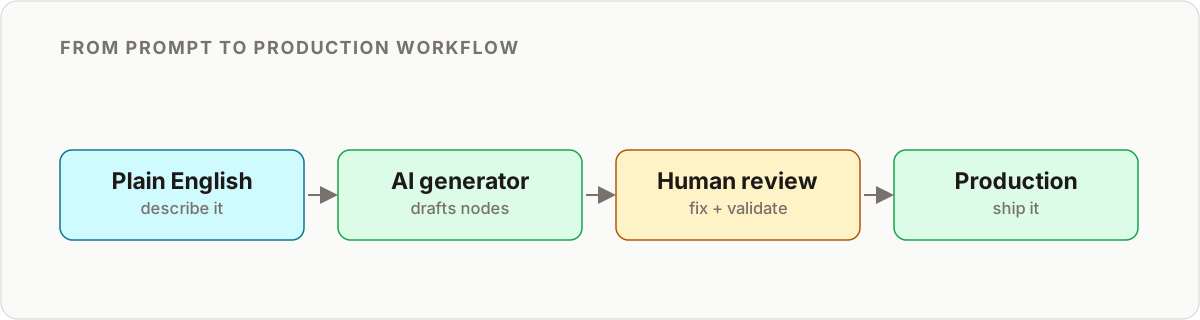
The term gets thrown around loosely, so let me be precise. When people say they want to generate n8n workflows with AI, they usually mean one of three things:
- Text to workflow tools like Brinode, purpose-built to take a prompt and output n8n-ready JSON.
- General-purpose models like Claude or GPT-4, prompted well enough to produce workflow JSON you paste into your instance.
- Agent-driven builders like n8n-MCP, where an AI automation builder connects directly to your n8n instance and constructs the workflow node by node against live schemas.
They sit on a spectrum from convenient to powerful, and they fail in different ways. Understanding which one you are using changes how much review the output needs.
They Are Fine for Toy Projects
Ask an AI to build “send me a Slack message when someone fills out a Typeform” and yes, it works. Congratulations, you saved yourself ten minutes of clicking. But that is not where automation gets hard, is it?
Simple flows share a shape: one trigger, one or two actions, no branching, no rate limits, no state to keep. That is exactly the shape an AI workflow generator nails, because the happy path is the only path. The output runs, it does what you asked, and nobody gets paged.
The trouble is that almost nothing worth automating stays that simple.
Where It All Falls Apart
I asked Brinode to build something real: a lead-scoring workflow that pulls from multiple sources, deduplicates contacts, enriches them via Clearbit, scores them against custom criteria, and routes to different Salesforce queues based on the score.
What I got back was technically correct. It would run. It would also:
- Hammer the Clearbit API with no rate limiting, which is how you lose an account.
- Fail silently when enrichment returned nothing, so bad data flows downstream unnoticed.
- Ignore that Salesforce has a batch limit, so it would choke at volume.
- Store my API key directly in the workflow JSON, in plain text.
None of that shows up in a demo. All of it shows up in production.
The silent failure is the one that scares me most. A workflow that crashes loudly gets fixed within the hour. A workflow that quietly enriches half your leads with blank data, or skips every record after the batch limit, can run for weeks before anyone notices the numbers are wrong. AI workflow generators optimize for “it runs,” and “it runs” is not the same as “it is correct.”
The AI does not know what it does not know. It has never been woken up at 2am because a workflow crashed. It has never had a client yelling about duplicate records. It has never had to explain to finance why the automation sent 50,000 emails instead of 500.
What works vs what fails
After enough of these tests, the pattern is consistent enough to put in a table. This holds across the text-to-workflow tools and the general models alike.
| Task | AI workflow generator result | Needs a human? |
|---|---|---|
| Single trigger, one or two actions | Reliable, ship-ready with a glance | Rarely |
| Boilerplate nodes (webhook, JSON parse, field mapping) | Reliable, saves clicking | No |
| Conditional branching and routing logic | Scaffolds it, logic often wrong | Yes |
| Rate limiting and API quotas | Usually absent | Yes |
| Error handling and retries | Usually absent | Yes |
| Deduplication and idempotency | Rarely considered | Yes |
| Batch limits (Salesforce, Google, etc.) | Ignored | Yes |
| Credential and secret handling | Frequently hardcoded, unsafe | Always |
| Timezone and locale edge cases | Missed | Yes |
| Explaining an existing messy workflow | Genuinely good | No |
The left column is where AI shines. The right column is the job. If you are deciding whether a given automation is even a fit for AI, this breakdown of when not to use AI workflows is a better filter than “can the tool produce something that runs.”
Comparing the Tools I Tested
Not every AI automation builder fails the same way. Here is how the main options stacked up.
| Tool | Best for | Watch out for |
|---|---|---|
| Brinode | Fast simple workflows, getting started | Thin on error handling and security |
| Claude / GPT-4 | Flexible JSON generation with good prompting | Needs heavy context, invents node params |
| n8n native AI features | Staying inside the platform | Still maturing, worth monitoring |
| n8n-MCP | Power users, agent-driven builds against live schemas | Steeper setup, most capable option today |
The general models are more flexible but more likely to hallucinate node parameters that do not exist, because they are guessing at schemas from training data. The agent-driven approach fixes that by reading your actual instance. That difference matters more than raw model quality, and it is the whole argument for connecting Claude Code to n8n via MCP rather than pasting JSON from a chat window. Once the agent can see real node definitions, you get closer to workflows that self-build against your instance instead of plausible-looking guesses.
What I Actually Use AI For Now
Here is the thing: I am not anti-AI. I use it constantly, just not the way it is marketed.
- Boilerplate. “Give me a basic webhook trigger that parses JSON and maps these fields to an HTTP request.” Done, three minutes saved.
- Explaining someone else’s mess. Inherited a 47-node workflow with no documentation? Paste it in, ask what it does. Genuinely useful.
- Brainstorming node options. “What n8n nodes work with HubSpot?” is faster than scrolling the list.
- First drafts I am going to rewrite anyway. Sometimes I just want something on the canvas to react to instead of staring at blank space.
Notice the pattern. Every one of those is either low-stakes or a starting point I will harden myself. None of them is “generate this and ship it.”
The Part Nobody Wants to Hear
The reason an AI workflow generator cannot replace real expertise is not about n8n. It is about understanding the business problem.
When a client says “automate our lead follow-up,” they do not actually mean that. They mean: “Automate our lead follow-up, but not for existing customers, unless they have not bought in six months, and definitely not the ones flagged by sales, and make sure it respects their timezone, and track opens but do not be creepy about it, and…”
AI cannot ask clarifying questions. It cannot push back on bad requirements. It cannot say “that is going to break when you hit 1,000 users, let’s architect this differently.” You can. That is the job.
Text to workflow is fundamentally a translation step. It translates a clear spec into nodes. It does not write the spec, and writing the spec is where most automations succeed or fail.
The Smart Pattern: AI Draft, Human Hardening
Here is how I actually work now, and it is faster than building from scratch while being far more reliable than raw AI output.
- Draft. Describe the automation to an AI workflow generator and get a rough version to react to.
- Review the structure. Is the basic approach sound? What is obviously missing? Are the nodes even real?
- Add the hard stuff. Error handling, rate limiting, deduplication, batch limits, security. This is the bulk of the value.
- Test like your job depends on it, because it does. AI output needs more testing, not less, precisely because it looks finished when it is not.
This produces better results than either pure-AI or pure-manual work, and it scales. The draft compresses the tedious first hour; the hardening is where you earn your keep.
If your automation involves an AI agent making decisions at runtime rather than just being generated by AI once, the review bar is even higher. That is a different discipline, and building reliable n8n AI agents deserves its own hardening checklist.
A Note on Code vs Canvas
One more thing the tools rarely tell you. An AI automation builder that outputs JSON is effectively pushing you toward a code-first mental model, even inside a visual tool like n8n. That is not automatically bad, but it changes how you review and maintain the result. If you are weighing whether to lean into generated JSON or stay hands-on in the editor, the tradeoffs in visual vs code workflow tools are worth reading before you commit a team to one style.
Key Takeaways
- AI workflow generators are excellent for simple, linear automations and for drafting. They are unreliable for anything with real branching, scale, or security requirements.
- Text to workflow output is a first draft. Assume it is missing rate limiting, error handling, deduplication, and secret management until you prove otherwise.
- The agent-driven approach (n8n-MCP) beats pasting JSON from a chat, because it reads your live node schemas instead of guessing.
- The durable skill is not connecting nodes. It is scoping the problem, handling edge cases, and translating vague requirements into systems that hold up at volume.
- Use AI to accelerate work you already understand. Let it handle the boilerplate. The boilerplate was never the valuable part.
If you are worried about AI taking your n8n work, you are worried about the wrong thing. The automators who will struggle are the ones who can only do what AI can do: basic node connections with no business context. Everyone else just got a faster first draft.
Need workflows that do not fall over at 3am? Start with the n8n reliability guide.
Frequently asked questions
What are AI workflow generators?
AI workflow generators are tools that turn a plain-English description into an automation. You type what you want (text to workflow) and the tool outputs runnable n8n JSON or builds nodes directly on the canvas. Examples include Brinode, general models like Claude and GPT-4 with good prompting, and n8n-MCP, which connects an AI agent straight to your instance.
Can AI workflow generators completely replace n8n experts?
No. They are excellent for simple, linear workflows and rapid prototyping. Complex business logic, proper error handling, performance at scale, and security still require human judgment. An AI automation builder is a productivity tool, not a replacement for someone who understands the business problem.
Is AI-generated n8n workflow code safe to use in production?
Not without review. AI tools often hardcode credentials, skip error handling, and ignore rate limits. Always review the output, add error handling, move secrets into credentials or environment variables, and test thoroughly before you deploy.
What is the best AI tool to generate n8n workflows with AI?
Brinode is purpose-built for n8n and handles simple flows well. For more complex needs, Claude or GPT-4 with strong prompting can produce sophisticated n8n JSON, and n8n-MCP goes furthest by connecting an AI agent directly to your instance so it can read live node schemas.
How accurate are AI-generated workflows?
For simple trigger, action, action flows, accuracy is high. For conditional logic, data transformations, and error handling, expect to rewrite a meaningful share of the output. The generator gets you started faster, but refinement is always part of the job.
Does text to workflow work for complex multi-step automations?
Partially. It will scaffold the happy path and connect the obvious nodes, which saves real time. It struggles with the parts that make an automation trustworthy: retries, deduplication, batch limits, timezone logic, and failure alerts. Those still need a human pass.
Should I learn n8n manually or just use AI generators?
Learn n8n properly first. Understanding how nodes work, how data flows, and how to debug issues is essential even when you use AI daily. The people who thrive use AI to accelerate work they already understand, not to skip understanding it.
Related reading
Keep learning
Step-by-step n8n tutorials, and free templates you can import and adapt.
Browse tutorials →Browse templates